Web and HTML Basics
CSC 105 - The Digital Age - Weinman
- Summary:
- We review a brief history of the Internet and the world
wide web, along with some simple mechanics of basic web pages.
The Internet and the World Wide Web
We use the Internet every day for many common tasks: sending and receiving
e-mail, looking up information on a variety of subjects, even making
phone calls with programs like Skype. While the Internet and World
Wide Web as we know them have developed into a rich, capable infrastructure,
the result we have before us now is not that different from what was
envisioned nearly seventy years ago.
Let's take a brief tour of some of the major developments
1945 - Vannevar Bush and the Memex
After World War II, an optimistic age was dawning. Vannevar Bush,
Director of the U.S. Office of Scientific Research and Development
wrote an article called "As
We May Think" for the Atlantic Monthly. This was a call
for scientists to develop tools to shift their focus from traditional
wartime armament developments to those that would enhance mental strength.
Bush proposed something called the "memex," or memory extender.
This would be a device for storing everything: books, records, communications,
etc. Influenced by the technology of the day, he suggested using microfilm
cameras and readers within a desk.
Significantly, one of the hallmarks of his proposal was that this
memex would feature trails of linked frames:
This is the essential feature of the memex. The process of tying two
items together is the important thing.
When the user is building a trail, he names it, inserts the name in
his code book, and taps it out on his keyboard. Before him are the
two items to be joined, projected onto adjacent viewing positions.
At the bottom of each there are a number of blank code spaces, and
a pointer is set to indicate one of these on each item. The user taps
a single key, and the items are permanently joined. In each code space
appears the code word. Out of view, but also in the code space, is
inserted a set of dots for photocell viewing; and on each item these
dots by their positions designate the index number of the other item.
Thereafter, at any time, when one of these items is in view, the other
can be instantly recalled merely by tapping a button below the corresponding
code space. Moreover, when numerous items have been thus joined together
to form a trail, they can be reviewed in turn, rapidly or slowly,
by deflecting a lever like that used for turning the pages of a book.
It is exactly as though the physical items had been gathered together
from widely separated sources and bound together to form a new book.
It is more than this, for any item can be joined into numerous trails.
-"As
We May Think", Vannevar Bush, Atlantic Monthly,
July 1945
Of course, today we see these trails as hyper-linked web pages. Interestingly,
Bush also remarks on utility of snapping a picture and looking at
it immediately, explicitly imagining a day when image production moves
beyond chemical baths.
1960s - Computer networks imagined and realized
Moving past Bush's vision into reality happened quickly in the 1960s.
Here are a few of the lighlights of that decade.
1962 - J. C. R. Licklider and the Intergalactic Computer Network
Early in the decade, MIT professor J. C. R. Licklider first proposed
a globally interconnected set of computers through which everyone
could quickly access data and programs from any site. Not only did
his writing describe most all aspects of our current Internet, it
was also the first recorded description of the social interactions
that could be enabled through networking.
Not likely a coincidence, two months after writing the proposals Licklider
was appointed to head computer research at the U.S. Advanced Research
Projects Agency (ARPA).
1966-1969 ARPANET
MIT Lincoln Laboratory researcher Lawrence G Roberts read about Licklider's
"Intergalactic Computer Network." Joining Licklider's office
as chief scientist in 1966, Roberts and others at ARPA designed something
called the ARPANET based on Licklider's proposal. By 1968, the agency
put out requests to over 100 contractors to actually build the network
based on their design. Because the plan represented such a radical
departure from current technology, few contractors even submitted
bids, and fewer still were considered reasonable candidates. Coincidentally,
Licklider's original company (before he moved to ARPA) was awarded
the project.
ARPANET was finally realized in 1969. Two computers-hardly intergalactic-were
connected initially and the first network message was sent from UCLA
to the Stanford Research Institute in September. Two months later,
UCSB and Utah were added. The ARPANET had four nodes.
1968 Douglas Engelbart and the "Mother of all Demos"
Meanwhile Douglas Englebart was at Stanford Research Institute building
technology that was highly influenced by his reading of Bush's memex.
In December 1968, he delivered to a computer conference what came
to be known as the "Mother of All Demos." This presentation
introduced the first presentation of the computer mouse, video conferencing
(via closed-circuit TV), and hypertext (a la Bush's linked frames),
among other important technologies.
Interestingly, you can actually watch a video
of the demo from forty years ago.
1970s - Practical applications
The 1970s saw the debut and growth of some practical applications
for computer networks. By 1970 the ARPANET had grown to 13 computers,
18 in 1971, 29 by 1972, and 40 by 1973. In October 1972, the ARPANET
was publicly demonstrated at the International Computer Communication
Conference. This also featured the debut of network email, which was
by far the largest network application for a decade. Hypermedia (e.g.
the "linked frames" proposed by Bush) also became more refined
in the 1970's, following Engelbart's demo.
The network kept growing to 57 nodes in 1975, with over 200 by 1981.
In 1973, the so-called TCP/IP protocol (which we use on today's Internet)
was designed for general, reliable computer communication. Unfortunately,
ARPANET host computers used the original NCP (Network Control Protocol)
to talk to each other. Because NCP was less flexible and powerful,
a change was needed.
1980s - Internet adolescence
January 1, 1983 was a so-called "flag day" on the fledgling
ARPANET. The etymology of the term "flag day" is somewhat obscure.
A historical but then widely used computer operating system needed
to change the ASCII character table because it had not yet been standardized.
Such a change would have ramifications for how documents were interpreted.
To avoid confusion or misinterpretation, all systems would have to
change at the same time, and this date was set for "Flag Day",
a U.S. national holiday in 1966. Since then, the date of a massive
change for which backwards compatibility is impossible has been termed
a "flag day."
The "flag day" of 1983 changed the language used by computers
connected to the ARPANET from NCP to the present day TCP/IP. Because
so few computers were connected to the network then, it was possible
to achieve this well-coordinated effort. On today's Internet, such
a transition would likely be impossible to accomplish without leaving
many parts of the network behind.
By 1985, the Internet was well established as a technology supporting
a broad community of researchers and developers. The backbone (the
biggest, most central connections on the network) went from just six
nodes with 56 kilobits/second connections to twenty one nodes with
multiple 45 megabit/second connections, a more than 12,000-fold
capacity increase. In that time, it grew to over 50,000 networks on
all seven continents and even outer space, with approximately 29,000
networks in the United States. Finally, Licklider's network was approaching
the intergalactic scale.
By the late 1980's, Tim Berners Lee invented the World Wide Web, a
channel on the Internet designed as a hyperlinked means of sharing
information.
1990s - The Internet comes of age
In 1990, ARPANET was formally decommissioned; it had become a full-fledged
global-and inter-planetary if not intergalactic-computer network
with vested interests well beyond the defense department.
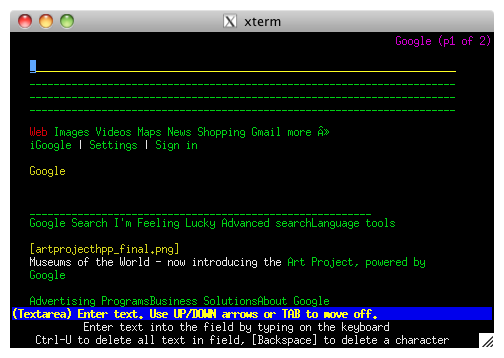
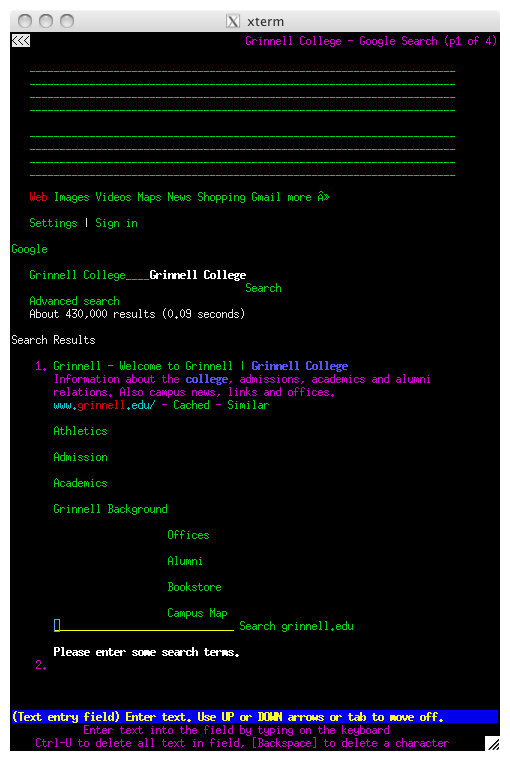
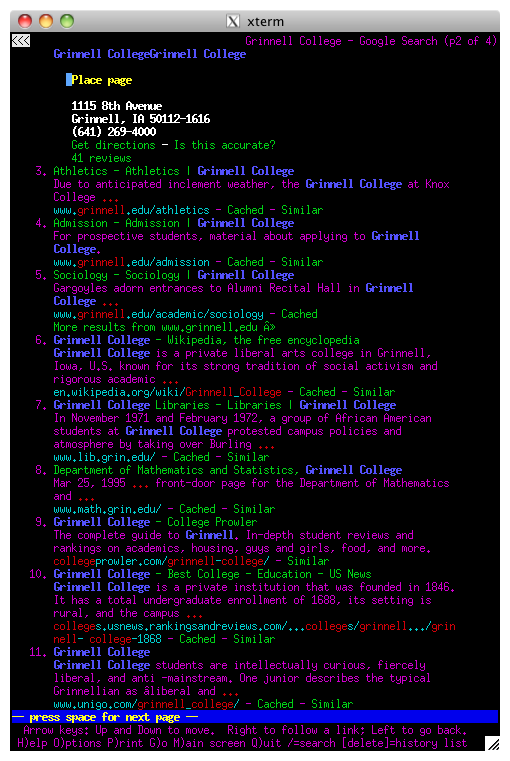
In 1992, the first web browser called lynx appeared - it
was a purely textual experience. For example, the images below show
the Google homepage in lynx and the first two pages of results
of a search for "Grinnell College."
Fortunately, not too much later in 1993, the National Center for Supercomputing
Applications (NCSA) in Illinois debuted the Mosaic web browser, which
was graphical. Although its functionality was less than the web browsers
of today, it did
not look much different, featuring forward/backward navigation buttons,
a URL bar, and a home button.
As a postlude, it is interesting to note how the creators of the Internet
have viewed its success:
A key to the rapid growth of the Internet has been the free and open
access to the basic documents, especially the specifications of the
protocols.
-A
Brief History of the Internet, Barry M. Leiner, Vinton G. Cerf,
David D. Clark, Robert E. Kahn, Leonard Kleinrock, Daniel C. Lynch,
Jon Postel, Larry G. Roberts, and Stephen Wolff
Web Pages
With some network history behind us, we can understand a little more
what exactly constitues a web page and how they are processed.
What is a web page? Nowadays, there are two kinds: the original, static
Web 1.0 flavor and the newer, dynamic Web 2.0 flavor. Static pages
display text, images, etc. Typically these are files coded in a specific
format called HTML. In contrast, dynamic pages are interative. Typically
they are search form results, or other new media like maps. Rather
than static files, they are more accurately thought of as a full-fledged
computer program accepting input and doing processing to produce output,
all over the network.
What is happening behind the scenes? Broady speaking, the computer
running your web browser sends a request for the given URL (e.g. www.google.com)
across the Internet. A web server, the host computer representing
www.google.com, answers this request and sends the contents
of an HTML file back to your computer, where the web browser renders
the HTML code into something more user friendly.
ASCII and beyond
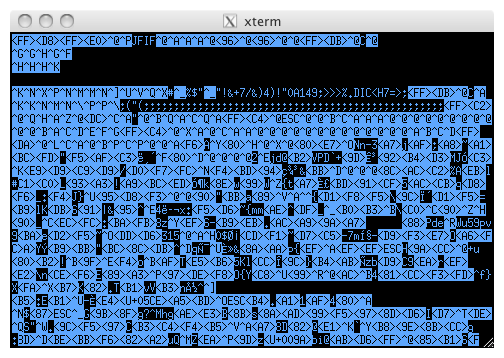
So just what is an HTML file? Let's back up a bit first. Remember
the shell program less? We used it to examine text files.
What if we used it to view an image from the Terminal? The figure
below shows the results, which are not likely to be interpreted as
an image of the author.
 As you no doubt know, an image, like any other sequence of bits, requires
some context or convention for interpretation. less is designed
to interpret ASCII files. Conventions also exist for interpreting
files that contain bits in a non-ASCII format such as word processor
files, images, spreadsheets, etc.
Web pages need some formatting information as well. There are a variety
of web browsers, including Safari on the Macintosh, Iceweasel on Linux,
and Internet Explorer on Windows. Moreover, there are a plethora of
web page authors on the Internet (you might be one). We therefore
need a code that anyone can use and doesn't require a specific piece
of software. Once we have agreed upon a code, anyone can implement
a piece of software to "speak" in that code. This is exactly
what the Internet's creators attributed its growth and success to.
In this case, the protocol or code language is HTML, a language for
writing web documents that is specified and controlled by an international
non-profit community called the World Wide
Web Consortium, or W3C.
As you no doubt know, an image, like any other sequence of bits, requires
some context or convention for interpretation. less is designed
to interpret ASCII files. Conventions also exist for interpreting
files that contain bits in a non-ASCII format such as word processor
files, images, spreadsheets, etc.
Web pages need some formatting information as well. There are a variety
of web browsers, including Safari on the Macintosh, Iceweasel on Linux,
and Internet Explorer on Windows. Moreover, there are a plethora of
web page authors on the Internet (you might be one). We therefore
need a code that anyone can use and doesn't require a specific piece
of software. Once we have agreed upon a code, anyone can implement
a piece of software to "speak" in that code. This is exactly
what the Internet's creators attributed its growth and success to.
In this case, the protocol or code language is HTML, a language for
writing web documents that is specified and controlled by an international
non-profit community called the World Wide
Web Consortium, or W3C.
HTML
HTML stands for HyperText Markup Language. Largely inspired and derived
from the linked trails of Bush's memex decades earlier, it specifies
a method for inter-linking documents. In this way, HyperText
suggests it is "more than" text.
What about the "Markup" part? Remember back to your junior high
school writing classes how your teacher would kindly add red marks
to your paper indicating where you should start new paragraphs (e.g.,
with the ¶ symbol). This was a simple way of describing how you should
format your text. HTML is in the same spirit. Your content begins
with text, but markup commands (the stuff in red pen) describe how
a web browser should make it look, such as centered, bold, tiny, or
even (heaven forbid) flashing.
The basic structure is relatively simple. An HTML file is surprisingly
written in plain text, such as ASCII. All markup commands are set
off from the actual content of the web page in what are called angle
brackets. For example: <command>. The left angle bracket
(or less than sign <) indicates the start of a command and
the right angle bracket (or greater than sign >) indicates
its end. A variety of commands can be given. Such a command typically
indicates the beginning of a region, such as a paragraph, a piece
of bold text, or otherwise. For example, a paragraph would be set
off in HTML as follows
-
<p>The command to the left indicates the start of a paragraph, which can continue (with lines automatically wrapped by the web browser) until the command to close the paragraph is given, as to the right.</p>
Note that the general means of closing a command is with its paired
closing tag, e.g. </command> or </p> in the paragraph
example above. These commands can also be nested one inside another
to give multiple effects. For instance the pair <b></b> renders
any text inside as bold, which we might use as follows.
-
<p>This paragraph contains some <b>really important</b> information.</p>
Some commands do not mark up a region of text, but simply add some
formatting. These combine the open/close tag into one command, such
as the line break command <br /> and horizontal rule (or
line) <hr />.
Other commands allow us to slightly modify their behavior by specifying
the value of particular parameters. In general, they have the form
-
<command param=value>
where param is a known parameter, which alters or specifies
the behavior of the given command, and value would
be some value the author would like to assign to the given parameter.
For instance, one can assign the background color of a web page body
to be white with the parameterized body command:
-
<body bgcolor="white">
Here, bgcolor is the parameter and "white"
is the value it is given.
In the next lab on HTML basics, you will set up your MathLAN account
to host your own web pages, learn a little bit more about HTML, and
begin to put the knowledge into practice.
Copyright © 2011 Jerod
Weinman.
 This work is licensed under
a Creative
Commons Attribution-Noncommercial-Share Alike 3.0 United States License.
This work is licensed under
a Creative
Commons Attribution-Noncommercial-Share Alike 3.0 United States License.