Computer Organization
CSC 105 - The Digital Age - Weinman
- Summary:
- We discuss the basics of the computer's central processing
unit (CPU) architecture and overall computer organization.
We have examined computation at many different levels this semester.
At the lowest level, we know how computers store and represent data
in binary bits. We also have seen how primitive digital circuits can
implement simple computations and storage (e.g., addition and flip-flop
memory). At a much higher level, you've written algorithms for solving
a variety of problems. In this reading and the next, we'll cover the
intermediate stages to learn how the smaller, low-level pieces made
up of bits and circuits combine to make larger components that can
be programmed.
Organization
There are essentially four major components (or categories) that comprise
a modern, general-purpose computer:
- CPU (Central Processing Unit)
- This piece is what actually
executes programs and performs the central computations.
- RAM (Random Access Memory)
- This piece stores data, like the
list of numbers being used in a binary search or the bytes of an ASCII-encoded
text file. It also stores the written instructions for a program or
algorithm.
- Peripherals
- These are just about any other major components you
might want to connect to the CPU or RAM to get input from for
computing with or send a computational result to as output.
Examples might include the video screen, a keyboard or mouse, hard
disks, or a network port.
- Buses
- These are the wires that connect and transport data among
all the aforementioned components.
Memory Hierarchy
Once we begin to talk about actually building a computer, it turns
out that how you data is nearly as important as how
you data. There are a variety of ways to implement
data storage on a computer. Just as with information stored in the
"real world," the spectrum of performance ranges from very fast,
expensive, low-capacity components to much slower, cheaper, and larger
capacity components. This spectrum represents the memory hierarchy.
At the highest level, data stored in a memory that uses logic gates
like those we have studied are called registers. Much like
your brain, data in registers may be accessed very quickly. Registers
are very expensive, thus computers tend to have relatively few of
them. Because they are so fast, they tend to be closest to where the
computation happens: inside the CPU.
At the next level is cache. This form of memory is a little
bit slower than registers, but data in the cache is still relatively
quick to access, much like a sheet of paper in front of you on the
desk. Cache accesses might take anywhere from five to twenty times
as long as a register access.
Below the cache in the hierarchy is the RAM. This is slower
yet and farther from the CPU, but it is where most of the computer's
data is stored. This form of memory might be more like reading something
from a book in your office. Accessing data stored in RAM may take
anywhere from twice to twenty-four times as long as a cache access.
In turn, the CPU could wait over one-hundred times as long for data
stored in RAM as it might for data stored in its registers. But there
is still another level of the hierarchy.
The RAM available to most computers today has grown substantially
with the concomitant decrease in price. However, as we operate on
larger and larger amounts of data, it seems never to be enough. Therefore,
when a computer program requires more data than will fit in its available
RAM, it will often resort to the hard disk, typically the
last stage of a memory hierarchy. The capacities of hard drives are
often one-thousand times bigger than the amount of available RAM.
However, this capacity comes at the cost of being over twenty-million
times slower than a register. Such a delay is worse than retrieving
a book from the library; it's more like inter-library loan.
The following table summarizes the properties of the memory hierarchy.
In the next section we'll discuss further details of the registers
and RAM, ignoring cache for now and deferring our discussion of disks
for another week.
| Hierarchy | Speed | Capacity | Cost ($/bit) | Distance |
| Registers | Fastest | Smallest | Highest | Nearest CPU |
| Cache | | | | |
| RAM | | | | |
| Disk | Slowest | Largest | Cheapest | Farthest from CPU |
CPU
The central processing unit is where most of the computational "action"
happens, so to speak. Here, we'll look at the major components of
the CPU and what their duties are. These are pictured in the figure
below.
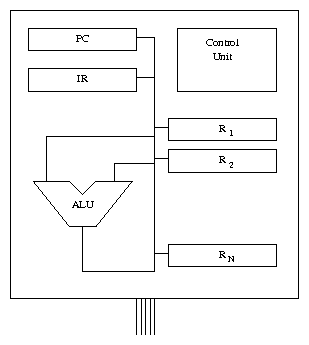 First up is the control unit. This piece of the CPU coordinates
all of its activities, controlling program execution. In essence,
it translates instructions (usually written by a programmer) into
physical signals that cause them to be executed. This typically means
sending appropriate signals through the ALU (arithmetic/logic
unit), which performs the most basic operations on data, such as addition
or computing a bit-wise logical AND between two binary words.
Of course, the data being added or ANDed must come from somewhere,
hence the need for general-purpose registers. As we mentioned,
these form the highest level of the memory and are actually within
the CPU. These registers (denoted R1,R2,...,RN in the
figure) store the operands (inputs) used by the ALU. Similarly, the
ALU can send its results back to store them in these registers.
In addition to the general-purpose registers, there are two special-purpose
registers in the CPU, namely the IR (instruction register)
and the PC (program counter). The IR stores the instruction
currently being executed. This instruction is then read by the control
unit, which configures the ALU (say to subtract, rather than add)
and the buses connecting all of the pieces so that the intended result
is computed on the correct input registers and stored in the correct
output register. The PC stores the address in memory where
the next instruction to be executed is located. Speaking of
a memory address, what is that? We discuss that next.
First up is the control unit. This piece of the CPU coordinates
all of its activities, controlling program execution. In essence,
it translates instructions (usually written by a programmer) into
physical signals that cause them to be executed. This typically means
sending appropriate signals through the ALU (arithmetic/logic
unit), which performs the most basic operations on data, such as addition
or computing a bit-wise logical AND between two binary words.
Of course, the data being added or ANDed must come from somewhere,
hence the need for general-purpose registers. As we mentioned,
these form the highest level of the memory and are actually within
the CPU. These registers (denoted R1,R2,...,RN in the
figure) store the operands (inputs) used by the ALU. Similarly, the
ALU can send its results back to store them in these registers.
In addition to the general-purpose registers, there are two special-purpose
registers in the CPU, namely the IR (instruction register)
and the PC (program counter). The IR stores the instruction
currently being executed. This instruction is then read by the control
unit, which configures the ALU (say to subtract, rather than add)
and the buses connecting all of the pieces so that the intended result
is computed on the correct input registers and stored in the correct
output register. The PC stores the address in memory where
the next instruction to be executed is located. Speaking of
a memory address, what is that? We discuss that next.
RAM
RAM is a large set of memory cells. Typically each cell consists of
multiple bytes, called a word. In modern computers, words are
often made of four or eight bytes, but this can vary substantially,
depending on whether the computer is a handheld tablet or a top-of-the-line
data-crunching server.
Each of these memory cells has an "address" or a location. Why
is this called "random access"? It is because we can access the
data at any location at any time simply by specifying its address.
Contrast this with something called "sequential access." As you
might guess, sequentially accessible data required you to march from
the start of the data through to the address you wanted. Think about
the difference between fast-forwarding on a cassette tape or VHS (sequential
formats) to find what you want and simply requesting a certain track
on a CD or DVD (random access formats).1 One may visualize RAM as a table of data, each line numbered with
the address of that data, as shown below. A program can then dynamically
read or write the contents of any RAM cell.
| Address | Data Value |
|
| 0 | 42 |
| 1 | 255 |
| 2 | 0 |
| ... | |
You may have noticed that the CPU as we have described it can only
operate directly on data that resides in its general-purpose registers.
However, there are not very many of these registers. Therefore, we
will need a way to access the much larger amount of storage available
in RAM.
Memory Bus
Finally, we discuss how data is transferred between the CPU's registers
and RAM (typically referred to simply as memory). The memory bus is
a collection of wires that facilitate this communication. Reading
from memory typically consists of the following three steps.
- The CPU sends an address over the bus to the memory component.
- The memory responds to this request by sending the data from that
address back to the CPU.
- Finally, the CPU stores this data in one of its registers.
As we noted earlier, the ALU may have computed hundreds of operations
using data in its local registers by the time data arrives from memory.
Thus, one important job of early programmers (and now compiler programs)
was managing the data to keep the most immediately needed values in
the registers, rather than in RAM.
Writing data to memory operates similarly, except the CPU sends both
the address and the data across the bus to the RAM, which then stores
the data at the appropriate location. Depending on the architecture
of the computer, the CPU may not necessarily need to wait for this
operation to complete before proceeding.
On the accompanying lab, you will experiment by manually configuring
registers and the ALU (playing the control unit), as well as reading
and writing data in memory in a small computer simulator.
Acknowledgments
Adapted from materials by Marge Coahran. Used by permission.
Copyright © 2011, 2014, 2015 Jerod
Weinman.
 This work is licensed under
a Creative
Commons Attribution-Noncommercial-Share Alike 3.0 United States License.
This work is licensed under
a Creative
Commons Attribution-Noncommercial-Share Alike 3.0 United States License.
Footnotes:
1Strictly speaking, CD and DVD media aren't completely random access,
because the read head must still be moved to the item requested. This
happens much faster than forwarding a tape, so that it seems more
like random access.