Drawing Generally and Concisely
Due: 9 a.m. Wednesday, 4 February 2009
Summary: In this assignment, you will experiment with drawing shadows and checkerboards. You will also write a procedure to draw an interesting picture that is scaled to a given width and height.
Purposes: To further practice with two different image models: GIMP tools and drawings-as-values. To consider concise algorithms for creating images with repetitive elements. To consider methods for scaling images to a given width and height. To gain experience writing procedures.
Expected Time: Two to three hours.
Collaboration: We encourage you to work in groups of size three. You may, however, work alone or work in a group of size two or size four. You may discuss this assignment with anyone, provided you credit such discussions when you submit the assignment.
Submitting:
Email your answer to <weinman>. The title of your email
should have the form HW3 and
should contain your answers to all parts of the assignment. Scheme code
should be in the body of the message.
Warning: So that this assignment is a learning experience for everyone, we may spend class time publicly critiquing your work.
Preliminaries
You will need some of the code from the lab on procedures to test the examples given in this assignment.
Assignment
Problem 1: Adding shadows
a) Define a procedure that corresponds to the following documentation. Include this documentation along with your definition of the procedure.
;;; Procedure:
;;;   shadow
;;; Parameters:
;;;   drawing, a drawing
;;; Purpose:
;;;   Create a shadow for drawing.
;;; Produces:
;;;   my-shadow, a drawing
;;; Preconditions:
;;;   No additional.
;;; Postconditions:
;;;   my-shadow is the same size and shape as drawing.
;;;   my-shadow is colored grey.
;;;   my-shadow is shifted up by 3 units and left by 6 units
;;;     relative to the position of drawing.
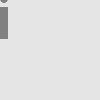
Here are some examples of applying this procedure.

(shadow red-eye)
(shadow (drawing-hshift blue-i 10))
b) Define a procedure ( that groups a drawing together
with its shadow. The shadow should appear behind. For example,
pair-with-shadow
drawing)

(pair-with-shadow (drawing-hshift (drawing-vshift red-eye 20) 20))
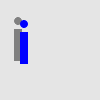
(pair-with-shadow (drawing-hshift (drawing-vshift blue-i 20) 20))
Problem 2: Drawing a checkerboard, concisely
Using the drawings-as-values model, write a program to draw a checkerboard: that is, an 8x8 grid of squares in alternating black and red colors. Your code should take advantage of the many similar elements in this figure.
Recall that the drawings-as-values model includes procedures such as
drawing-scale, drawing-hshift,
drawing-recolor, and
drawing-group.
Problem 3: Drawing interesting pictures, generally
You have already written several programs to create interesting pictures
using the GIMP tools.
For example, you wrote programs to make a smiley
face and a house for the
lab on scripting the GIMP
tools.
You also wrote a program to create a picture of your own design in
homework 2.
Recall that the GIMP tools procedures include
context-set-fgcolor!,
image-select-ellipse!,
image-fill-selection!,
and so on.
Take one of these three programs: your program to create a smiley face, your program to create a house, or your program from homework 2. Copy and paste it into the body of a new procedure, like so:
(define your-proc-name
  (lambda (image width height)
     ; Your code for making a picture with GIMP tools goes here
     ))
Delete the line of code that defines a new image. You should not define a new image inside the procedure, because the image is one of the parameters. You may need to change the procedure definition so that the parameter name for the image matches the name of the image in your code.
Try calling your procedure. If you originally made a 200x200 image, you would call your new procedure as follows:
>(define canvas (image-new 200 200))>(image-show canvas)1>(your-proc-name canvas 200 200)
You should see your picture of a smiley face, or whatever, appear in the image.
But what if you wanted to make a picture that was some other size, and not 200x200? That is where the width and height parameters come in.
Modify your code, still using the GIMP tools procedures, so that the
numbers in your code are related to the width and
height parameters. For example, if your original
program selected a 100x50 ellipse in a 200x200 image,
you would modify the call to image-select-ellipse!
to instead select an ellipse with the
dimensions (* 0.5 width) by (* 0.25 height).
You may alter your original instructions to make them simpler, for example, changing the size and location of elements or removing elements altogether.
Your procedure may take other parameters if you wish, but this is not required. If you add extra parameters, please provide informal documentation explaining how we should use your procedure.
For example, we defined a procedure called
sams-smiley! that generalizes the original smiley
face from the
lab on scripting the GIMP
tools.
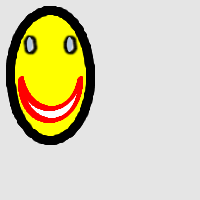
Here are some examples of using sams-smiley! to
make a smiley face
in a 200 x 200 image.
(define canvas (image-new 200 200))
(image-show canvas)
(sams-smiley! canvas 200 200)

(define another-canvas (image-new 200 200))
(image-show another-canvas)
(sams-smiley! another-canvas 100 150)
Important Evaluation Criteria
The first criterion we will use in evaluating your work is correctness. In particular, we will check to ensure that each program or procedure generates an appropriate image.
The second criterion we will use in evaluating your work is conciseness. That is, we will look to see whether your code is short or long for the problem. We will not differentiate short and long variable names, so please use comprehensible names.
The final criterion we will use in evaluating your work is generality. That is, for questions where you are asked to write a procedure, we will look at whether your procedure behaves correctly in a variety of situations.
Extra credit opportunity
We will award 1/2 point of extra credit for the most concise code to draw a checkerboard.