Assignment 3: Transforming Colors and Images
Due: 9:00 a.m., Wednesday, 23 February 2011
Summary: In this assignment, you will explore two image models, the pixel model and drawings, as well as colors and their transformations. Our focus will be on using lists, iteration, and anonymous procedures within each of the models.
Purposes: To give you more experience with each of the image models. To give you more comfort with anonymous procedures.
Expected Time: Two to three hours.
Collaboration: We encourage you to work in groups of size three. You may, however, work alone or work in a group of size two or size four. You may discuss this assignment with anyone, provided you credit such discussions when you submit the assignment.
Submitting:
Email your answer to <grader-151-01@cs.grinnell.edu>. The title of
your email should have the
form CSC151-01 Assignment 3: Transforming Colors and Images
and should contain your answers to all parts of the assignment.
Scheme code should be in the body of the message.
Warning: So that this assignment is a learning experience for everyone, we may spend class time publicly critiquing your work.
Assignment
Problem 1: Visualizing Colors
As you saw in your initial exploration of RGB colors in GIMP and MediaScript, there are a wide range of of colors possible. You may have also discovered that it is difficult to figure out what color a particular RGB triple, such as (18,223,51) represents. It is also useful to see how a variety of colors relate to each other.
It can thefore be helpful to build tools to help you understand colors and their relationships. We will start by building such a tool.
Write a procedure,
(,
that produces a simple
visualization of a list of colors by making a list of copies of some
simple shape, each colored with a different color, and each shifted
slightly from the last.
You may choose the shape, size, and amount to shift subsequent shapes.
visualize-colors
list-of-colors
number-of-colors)
An Example
For example, consider the following command
>(visualize-colors (list "red" "orange" "yellow" "green" "blue" "indigo" "violet") 7)
If we use circles of diameter 20, with each subsequent circle starting 15 units to the right of the previous circle, we should get something like the following.

Similarly, we can visualize a variety of shades that start with pink using the following.
>(visualize-colors (list RGB-PINK (rgb-darker RGB-PINK) (rgb-darker (rgb-darker RGB-PINK)) (rgb-darker (rgb-darker (rgb-darker RGB-PINK))) (rgb-darker (rgb-darker (rgb-darker (rgb-darker RGB-PINK))))) 5)
Using the same visualization technique (circles of radius 20, spaced by 15 units), we would get the following image.

Some Notes
You will find it easier to do this assignment if you break the problem down in to steps.
- Create some basic shape. (We shifted the unit circle by 0.5 and then scaled it by 20.)
- Make a list (of the appropriate size) of multiple copies of that shape. In the first case, we made a list of seven circles; in the second, we made a list of five circles.
- Make a list of offsets. (We made the list (0 15 30 45 ...).)
-
Use
map(along with an appropriate procedure) to offset your shapes. -
Use
map(along with an appropriate procedure) to color your shapes. - Turn that list of shapes into an image.
- Show that image.
Problem 2: Visualizing Transforms
Using your visualize-colors procedure, write a procedure
(, that takes a
color and a list of color transforms (along with the list's
length) and visualizes the result of applying each transform to the color.
visualize-transforms
rgb-color
list-of-transforms
number-of-transforms)
For example,
>(visualize-transforms RGB-PINK (list (lambda (rgb) rgb) rgb-darker (o rgb-darker rgb-darker) (o rgb-darker rgb-darker rgb-darker) (o rgb-darker rgb-darker rgb-darker rgb-darker) 5)
might give
Problem 3: Flattening Colors
One common technique for manipulating images is to “flatten” the colors in the image, using a much more restricted scale. For example, we might ensure that the components are each multiples of 16, 32, or 64. (Well, we'll use 255 instead of 256 for the highest multiple.)
How do we convert each component to the appropriate multiple? Consider the case of multiples of 32. If we divide the component by 32, round, and then multiply by 32, we'll get the nearest multiple of 32. For example,
>(* 32 (round (/ 11 32)))0>(* 32 (round (/ 21 32)))32>(* 32 (round (/ 71 32)))64>(* 32 (round (/ 91 32)))96>(* 32 (round (/ 211 32)))224>(* 32 (round (/ 255 32)))256
Document and write a procedure, ( that flattens
rgb-flatten
rgb base)rgb by converting each component of
rgb to the nearest multiple of
base.
Problem 4: Flattening Images
Write a procedure, (
that creates a new image by flattening the color of each pixel
in image-flatten
image base)image, so that each color's component is
converted to the nearest multiple of base.
Note: You should use
your rgb-flatten procedure.
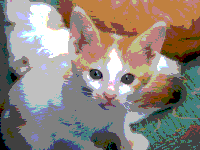
(image-flatten kitten 64)
Important Evaluation Criteria
We will judge your solutions on their correctness, conciseness, and cleverness.
