Assignment 4: Transforming Colors and Images
Due: 10:30 p.m., Tuesday, 30 September 2014
Summary: In this assignment, you will explore two image models, the pixel model and drawings, as well as colors and their transformations. Our focus will be on using lists, iteration, and anonymous procedures within each of the models.
Purposes: To give you more experience with each of the image models. To give you more comfort with anonymous procedures. To emphasize the re-use of procedures.
Collaboration: We encourage you to work in groups of size two or three. You may not work alone. You may not work with someone you have worked with on a prior homework assignment. Please collaborate on every problem - do not break up the work so that one person works on problem 1, another on problem 2, and another on problem 3. (The “do not break up the work” policy applies to every assignment. This note is just a reminder.)
Submitting:
Email your answer to <grader-151-02@cs.grinnell.edu>. The title of
your email should have the
form CSC-151-02 Assignment 4: Transforming Colors and Images
and should contain your answers to all parts of the assignment.
Scheme code should be in the body of the message.
Warning: So that this assignment is a learning experience for everyone, we may spend class time publicly critiquing your work.
Preface
In the recent reading on homogeneous
lists, you learned that one straightforward way to use
map for manipulating a list of drawings with a
procedure that takes two parameters (one of them a drawing) is to build
an auxiliary list containing copies of the other parameter.
For example, say we wanted to scale every drawing by the same amount. We might write scale-drawings as follows.
(define scale-drawings
  (lambda (factor drawings)
    (map scale-drawing
         (make-list (length drawings) factor)
         drawings)))
This procedure is particularly nice because the body looks a lot
like how we would scale a single drawing,
(, with an call to
scale-drawing
factor
drawing)map inserted before
scale-drawing, a call to
make-list used to expand the scaling factor to
a list, and finally using a list of drawings rather than a single
drawing.
Unfortunately, this approach has a darker side. Much like nested
calls to image-variant inefficiently create an
intermediate image that is eventualy discarded, the procedure
scale-drawings above creates an intermediate
list. Let's look at why that is. The function we map,
scale-drawing takes two parameters, therefore
map requires two lists. In order to give
scale-drawing its requisite scale factor for
each drawing in the list of drawings, we expand the individual
factor to a list of copies of
factor. How many? As many as there are
drawings in the list.
How can we avoid this unnecessary list creation, which could be
especially cumbersome when the list of drawings is long? If the root
of the problem is that the procedure being mapped takes two
parameters, then why don't we just use a procedure that takes only
one parameter, namely the drawing to be scaled. After all, the scale
factor doesn't vary, and one common use of map
is to repeatedly apply some operation to a list of assorted values.
We can try writing our own procedure that takes just the drawing, and we might start with something like the following.
(define scale-drawings-v2
(lambda (factor drawings)
(map my-scale-drawing drawings)))
(define my-scale-drawing
(lambda (drawing)
(scale-drawing ...
We might get stuck here, because at that point we realize we need a
scale factor. If we add another parameter to
my-scale-drawing then we are right back where
we began. If we use an externally defined scale factor, that value
wouldn't necessarily be the same one given to
scale-drawings.
Fortunately, at this point we should not abandon hope, but actually
be encouraged because we're on to something. We might not be able to
solve the problem by naming a separate
my-scale-drawing procedure. However, because
factor gets its value inside the body of
scale-drawings, we could write an expression
using factor there. Moreover, because what we
need is a procedure that takes a single argument (just like
my-scale-drawing did), it seems the expression
we need is a procedure. In this case, that procedure will need to be
anonymous. Putting all of this together, we might write the following.
(define scale-drawings-v3
(lambda (factor drawings)
(map
(lambda (drawing)
(scale-drawing factor drawing))
drawings)))
What does this code do? In the body of
scale-drawings we map a procedure that takes a
single parameter, a drawing, over a list of drawings. That anonymous
procedure scales the given drawing by the
factor given to
scale-drawings.
While this solution no longer has the form analogous to a call to
scale-drawing, it does get eliminate the
inefficient building of an extra list. We will leave it to you to
decide which you prefer. (At least one instructor prefers the
efficient version more because it does not sacrifice elegance.)
What is the moral of this story? In part, it is to demonstrate that there are alternative approaches. Moreover (as you should discover in working the problems for this assignment), sometimes using an anonymous procedure this way is the only way to solve the problem.
Assignment
Problem 1: Visualizing Colors
As you saw in your initial exploration of RGB colors in GIMP and MediaScript, there are a wide range of of colors possible. You may have also discovered that it is difficult to figure out what color a particular RGB triple, such as (18,223,51) represents. It is also useful to see how a variety of colors relate to each other.
It can thefore be helpful to build tools to help you understand colors and their relationships. We will start by building such a tool.
Write a procedure,
(,
that produces a simple
visualization of a list of colors by making a list of copies of some
simple shape, each colored with a different color, and each shifted
slightly from the last.
You may choose the shape, size, and amount to shift subsequent shapes.
visualize-colors
list-of-colors
number-of-colors)
An Example
For example, consider the following command
>(visualize-colors (list "red" "orange" "yellow" "green" "blue" "indigo" "violet") 7)
If we use circles of diameter 20, with each subsequent circle starting 15 units to the right of the previous circle, we should get something like the following.

Similarly, we can visualize a variety of shades that start with pink using the following.
>(define PINK (color-name->irgb "pink"))>(visualize-colors (list PINK (irgb-darker PINK) (irgb-darker (irgb-darker PINK)) (irgb-darker (irgb-darker (irgb-darker PINK))) (irgb-darker (irgb-darker (irgb-darker (irgb-darker PINK))))) 5)
Using the same visualization technique (circles of radius 20, spaced by 15 units), we would get the following image.

Some Notes
You will find it easier to do this assignment if you break the problem down in to steps.
- Create some basic shape. (We shifted the unit circle by 0.5 and then scaled it by 20.)
- Make a list (of the appropriate size) of multiple copies of that shape. In the first case, we made a list of seven circles; in the second, we made a list of five circles.
- Make a list of offsets. (We made the list (0 15 30 45 ...).)
-
Use
map(along with an appropriate procedure) to offset your shapes. -
Use
map(along with an appropriate procedure) to color your shapes. - Turn that list of shapes into an image.
- Show that image.
Problem 2: Visualizing Transforms
Using your visualize-colors procedure, write a procedure
(, that takes as
input an integer-encoded RGB color
and a list of color transforms (along with the list's
length) and visualizes the result of applying each transform to the color.
visualize-transforms
irgb-color
list-of-transforms
number-of-transforms)
For example,
>(visualize-transforms (color->irgb "pink") (list (lambda (irgb-color) irgb-color) irgb-darker (o irgb-darker irgb-darker) (o irgb-darker irgb-darker irgb-darker) (o irgb-darker irgb-darker irgb-darker irgb-darker)) 5)
might give
Hint: If you can turn the list of transformations
into a list of colors, you can then call
visualize-colors on that list of colors.
Do not copy and paste your code from Problem 1:
This will just make your solution to this problem more complicated
and harder to understand. (Also, if you made any errors in
visualize-colors, now you will have two places to
fix that error instead of one!)
Problem 3: Flattening Colors
One common technique for manipulating images is to “flatten” the colors in the image, using a much more restricted scale. For example, we might ensure that the components are each multiples of 16, 32, or 64. (Well, we'll use 255 instead of 256 for the highest multiple.)
How do we convert each component to the appropriate multiple? Consider the case of multiples of 32. If we divide the component by 32, round, and then multiply by 32, we'll get the nearest multiple of 32. For example,
>(* 32 (round (/ 11 32)))0>(* 32 (round (/ 21 32)))32>(* 32 (round (/ 71 32)))64>(* 32 (round (/ 91 32)))96>(* 32 (round (/ 211 32)))224>(* 32 (round (/ 255 32)))256
Document and write a procedure,
( that flattens an integer-encoded
RGB color, irgb-flatten
irgb-color
base)irgb-color, by converting each
component of irgb-color to the nearest multiple of
base.
As the last example suggests, we may sometimes get a number outside
of the range 0..255. Fortunately, the irgb and
irgb-new functions treat 256 the same as 255.
At the end of this assignment, you can find a test suite for
irgb-flatten.
Problem 4: Flattening Images
Write a procedure, (
that creates a new image by flattening the color of each pixel
in image-flatten
image base)image, so that each color's component is
converted to the nearest multiple of base.
Note: You should call
your irgb-flatten procedure you wrote in Problem 3.
Do not copy and paste the code.
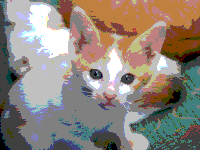
(image-flatten kitten 64)
Important Evaluation Criteria
We will judge your solutions on their correctness, conciseness, and cleverness.
A Test Suite for irgb-flatten
Here is a sample test suite for irgb-flatten. You'll note
that we've used a variety of bases and inputs. We've also made a
somewhat strange choice: Rather than directly using the output of
irgb-flatten, we've converted that output to a string
and compared strings. Why? Because that way, when a test fails,
you'll see the components, and that may suggest why things have not
worked as they should.
(define BLACK (color-name->irgb "black"))
(define WHITE (color-name->irgb "white"))

(define irgb-flatten-tests
  (test-suite
   "tests of irgb-flatten"
   (test-case
    "black, different bases"
    (check-equal? (irgb-flatten BLACK 16) BLACK)
    (check-equal? (irgb-flatten BLACK 37) BLACK)
    (check-equal? (irgb-flatten BLACK 120) BLACK)
    (check-equal? (irgb-flatten BLACK 128) BLACK))
   (test-case
    "white, standard bases"
    (check-equal? (irgb-flatten WHITE 16) WHITE)
    (check-equal? (irgb-flatten WHITE 128) WHITE))
   (test-case
    "white, strange bases"
    ; 259 is the closest multiple of 37, should shift to 255
    (check-equal? (irgb-flatten WHITE 37) WHITE)
    ; 240 is the closest multiple of 120
    (check-equal? (irgb->string (irgb-flatten WHITE 120))
                  "240/240/240"))
   (test-case
    "small components, rounding down"
    (check-equal? (irgb-flatten (irgb 3 3 3) 32) BLACK)
    (check-equal? (irgb-flatten (irgb 17 18 19) 64) BLACK)
    (check-equal? (irgb-flatten (irgb 9 4 7) 23) BLACK))
   (test-case
    "large components, rounding up"
    (check-equal? (irgb-flatten (irgb 230 240 250) 64) WHITE)
    (check-equal? (irgb-flatten (irgb 230 240 250) 128) WHITE)
    (check-equal? (irgb->string (irgb-flatten (irgb 230 240 250) 50))
                  "250/250/250"))
   (test-case
    "almost midway between multiples"
    (check-equal? (irgb->string (irgb-flatten (irgb 21 61 221) 40))
                  "40/80/240")
    (check-equal? (irgb->string (irgb-flatten (irgb 19 59 219) 40))
                  "0/40/200")
    (check-equal? (irgb->string (irgb-flatten (irgb 18 53 193) 35))
                  "35/70/210")
    (check-equal? (irgb->string (irgb-flatten (irgb 17 52 192) 35))
                  "0/35/175"))
   (test-case
    "different components, all round up"
    (check-equal? (irgb->string (irgb-flatten (irgb 17 58 195) 20))
                  "20/60/200")
    (check-equal? (irgb->string (irgb-flatten (irgb 23 18 21) 32))
                  "32/32/32")
    (check-equal? (irgb->string (irgb-flatten (irgb 65 90 118) 127))
                  "127/127/127"))
   (test-case
    "different components, all round down"
    (check-equal? (irgb->string (irgb-flatten (irgb 35 175 210) 17))
                  "34/170/204")
    (check-equal? (irgb->string (irgb-flatten (irgb 210 175 35) 17))
                  "204/170/34")
    (check-equal? (irgb->string (irgb-flatten (irgb 130 90 200) 64))
                  "128/64/192"))
   (test-case
    "different components, round in different ways"
    (check-equal? (irgb->string (irgb-flatten (irgb 35 180 205) 18))
                  "36/180/198")
    (check-equal? (irgb->string (irgb-flatten (irgb 89 34 55) 11))
                  "88/33/55")
    (check-equal? (irgb->string (irgb-flatten (irgb 60 150 200) 128))
                  "0/128/255"))
   (test-case
    "base of 1 should leave values unchanged"
    (check-equal? (irgb->string (irgb-flatten (irgb 17 31 93) 1))
                  "17/31/93")
    (check-equal? (irgb-flatten BLACK 1) BLACK)
    (check-equal? (irgb-flatten WHITE 1) WHITE)
    (check-equal? (irgb->string (irgb-flatten (color->irgb "turquoise") 1))
                  (irgb->string (color->irgb "turquoise"))))))
Remember that to use these tests, you'll need to add
(require rackunit) and (require rackunit/text-ui)
to the top of your program.
To run the tests, simply type (run-tests irgb-flatten-tests)
in your interactions pane.
