Functions
Introduction
As with Scheme, a function or procedure in C is designed to perform a task. Several variations are possible, such as the following:
- The task may be self contained, or it it may depend upon some starting data.
- The task may or may not change its environment (e.g., the task might move the robot or print something to a terminal window).
- When the task finishes, data may or may not be computed and returned for use in the main program.
Altogether, a function or procedure performs some work. They are used to abstract the work into a single coherent operation. Variations arise in whether or not data are needed to start the work and whether or not computed results are returned to the main program.
In this reading, we examine how functions are created and used in the
C programming language. Some functions may take values as parameters,
as you are likely accustomed to in Scheme. Similarly, some functions
return values, while others are simply called for their side
effect. When such functions produce no value, their return type is
void.
Textbook Reading
Begin with a reading from your textbook:
- King: Sections 9.1-9.2, 9.4, pages 183-192, 201-202, or
- K&R: 1.7, 4.1-4.3
Examples
Using the textbook as background, examine the following programs.
quadratic
/* program to illustrate 4 functions related to the quadratic formula
   given a, b, and c, the formula computes solutions to
      a * x^2 +b * x + c = 0
   if discriminant = sqrt (b*b - 4*a*c), a != 0, and discriminant > 0,
   then the two real solutions of this equation are
     (-b + discriminant) / (2.0 * a)
  and
     (-b - discriminant) / (2.0 * a)

  compile, linking with the math library, using the line
      gcc -lm -o quadratic quadratic.c
*/

#include <stdio.h>
#include <math.h>

/* print equation */
void printEqn(double coeff2, double coeff1, double coeff0)
{
  printf("Equation:  %lf*x^2 + %lf*x + %lf = 0\n", coeff2, coeff1, coeff0);
}

/* computation of the discriminant */
double disc(double r, double s, double t)
{
  return sqrt(s*s - 4*r*t);
}

/* print roots of the quadratic formula */
void printRoots(double a, double b, double c)
{
  double discriminant = disc(a, b, c);
  double root1 =  (-b + discriminant) / (2.0 * a);
  double root2 =  (-b - discriminant) / (2.0 * a);

  printf("    Roots:  %lf and %lf\n", root1, root2);
}

/* control processing for x^2 - 3*x + 2.0 = 0 */
void eqn1()
{
  printEqn(1.0, -3.0, 2.0);
  printRoots(1.0, -3.0, 2.0);
}

/* control processing for 2.0*x^2 - 7.0*x - 4.0 = 0 */
void eqn2()
{
  printEqn(2.0, -7.0, -4.0);
  printRoots(2.0, -7.0, -4.0);
}

int main ()
{
  printf ("program illustrating functions and the quadratic formula\n");

  eqn1();
  eqn2();

  return 0;
}
yoyo
/* program to use functions with value parameters to control a robot */

#include <stdio.h>
#include <MyroC.h>
#include <unistd.h>

/* yoyo illustrates:
      function with 1 parameter:  count
                    2 local variables: i, reps
                    1 return value
*/
int yoyo (int count)
{
  int i;
  int reps = 3*count;

  /* repeat motion */
  for (i = 0; i < reps; i++)
    {
      rForward (1, .5);
      rBackward (1, .5);
    }

   sleep (3);

  /* print local variables */
  printf ("in yoyo:  count = %d, reps = %d\n", count, reps);

   return reps;
} // yoyo


int main ()
{
  rConnect ("/dev/rfcomm0");

  int repetitions, result;

  repetitions = 2;
  result = yoyo (repetitions);
  printf ("repetitions = %d,   result = %d\n", repetitions, result);

  rDisconnect ();
}
value-params
/* value-params.c
 *
 * Demonstrates scoping of variable names and passing values into functions.
 */

#include <stdio.h>

int procA (int a, int b)
{
  printf ("procA1  a=%d, b=%d\n", a, b);
  a = 5;
  b = 6;
  printf ("procA2  a=%d, b=%d\n", a, b);
  return a + b;
}

void procB (int x, int y)
{
  int z = procA (x, y);
  printf ("procB1  x=%d, y=%d, z=%d\n", x, y, z);
  x = 5;
  y = 6;
  printf ("procB2  x=%d, y=%d, z=%d\n", x, y, z);
}

int main ()
{
  int x, y;
  x = 2;
  y = 3;
  printf ("main1   x=%d, y=%d\n", x, y);
  procB (y, x);
  printf ("main2   x=%d, y=%d\n", x, y);

  return 0;
}
Schematic Memory Diagrams
When analyzing a C program, it often is helpful to create a schematic of a computer's memory. Overall, each procedure requires memory for its parameters and any local variables. This amount of space is allocated whenever the procedure is called, and this space is deallocated when the procedure finishes.
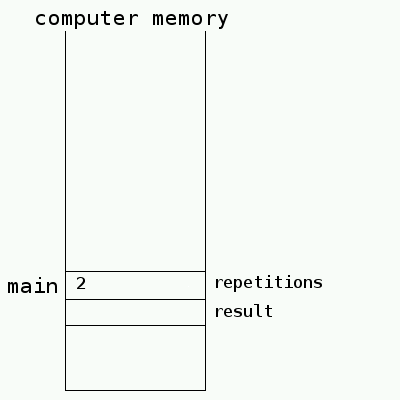
To clarify, consider the
original yoyo.c program.
When the program begins, space is allocated for the
variables, repetitions and result in
the main procedure. The
assignment repetitions = 2; stores the number
2 in the location for the repetitions variable.
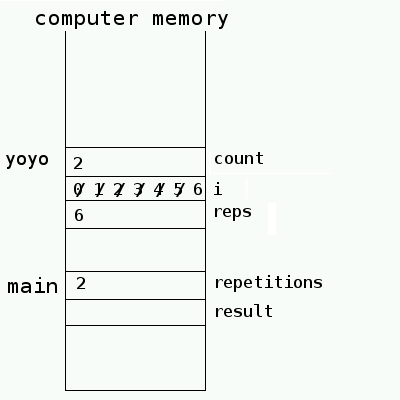
When the yoyo procedure is called, new space is
allocated for the parameter count and for local
variables i and reps. During the call
to yoyo, the value of the variable repetitions is
copied into the space for the parameter count. That is, the value
2 is now stored in two places (e.g., repetitions
and count).
When yoyo executes, reps is given the value
6. The variable i takes on successive values 0, 1, 2,
3, 4, 5, and 6.
As yoyo finishes, it returns the value of reps (6).
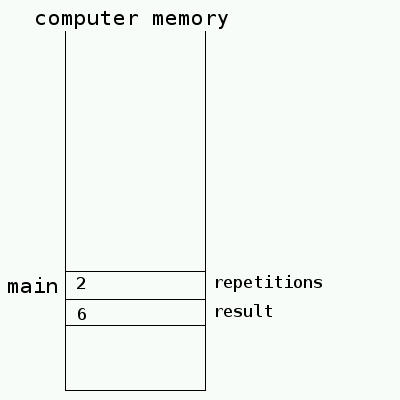
When yoyo is finished, its space is deallocated, and the
returned value is stored in variable result.
