Functions and Pointer Parameters
Preparation
As a security measure, many operating systems randomize the layout of a program's memory address space, which makes any vulnerabilities more difficult to discover and exploit across different runs of the program. Such randomization also makes it more difficult for beginning students (such as yourself) to learn and understand memory layout. As a result, we'll need to disable address space layout randomization (ASLR) for the purposes of this lab.
To start a new shell (the program that actually is running in your Terminal window, listening to and obeying your commands) with ASLR disabled, run the following command in your Terminal:
setarch `uname -m` -R /bin/bash
Make sure you use this Terminal window to complete Exercises 1–6. If your work is interrupted (i.e., by the end of classtime), simply log in again and re-run the command above in your Terminal before continuing.
If you forget or neglect to disable ASLR, you'll see different pointer addresses for different runs of the same program.
Finding the Perimeter and Area of a Rectangle
In the previous lab, you were asked to
write two functions related to circles: one computed the
circumference given the radius, and the second computed the area
given the radius. Following the same approach, program
perim-area-1.c
computes the perimeter and area of a rectangle, given the lengths of
the two sides.
-
Copy
perim-area-1.cto your account. Compile and run it, and review how the program works.-
Following the approach of
the previous lab, draw a
schematic diagram of main memory after the
function
calculate_perimeterhas been called just before it returns; and draw a second schematic diagram of main memory after the functioncalculate_areahas been called, just before it returns. (For now, omit any addresses from your diagram.) -
In C, the address operator (
&) allows one to determine the location or address in main memory where a variable is located. Make the following insertions intoperim-area-1.c:Insert into
calculate_perimeterjust before thereturnstatement:printf ("parameter side1: location: %p, value: %lf\n", &side1, side1); printf ("parameter side2: location: %p, value: %lf\n", &side2, side2); printf ("local lengthPlusWidth: location: %p, lengthPlusWidth: %lf\n", &lengthPlusWidth, lengthPlusWidth);Insert into
calculate_areajust before thereturnstatement:printf ("parameter side1: location: %p, value: %lf\n", &side1, side1); printf ("parameter side2: location: %p, value: %lf\n", &side2, side2);Insert into
mainjust before thereturnstatement:printf ("variable length: location: %p, value: %lf\n", &length, length); printf ("variable width: location: %p, value: %lf\n", &width, width); printf ("variable perim: location: %p, value: %lf\n", &perimeter, perimeter); printf ("variable area: location: %p, value: %lf\n", &area, area);Note: The
%pformat string instructsprintfto interpret the argument as a pointer, which is an address, which is actually an integer. The size of such an integer is platform-dependent, so it is best to let the standard I/O library handle the interpretation, rather than casting the address to anunsigned long int, or whatever the equivalent integer size may be.Rather than displaying the address as a decimal number, the value is printed in so-called hexadecimal format, where each position in the number is a power of 16 (instead of the usual power of 10). Because we want each digit to represent a single power, numbers larger than 9 must be represented by the characters
a–f, wherearepresents 10,bis 11, and so on up tofas 15 (that being the largest possible digit value in a base sixteen number system, much like 9 is the largest digit value in the ordinary base ten, or decimal, number system). Hex values are typically preceded by the0xprefix. -
Recompile and run your program. To interpret the output, suppose that the first
printfstatement in thecalculate_perimeterfunction produced the output:parameter side1: location: 28580, value: 5.00000
This indicates that the parameter
side1corresponds to memory location28580, and the value5.0is stored there. This part of the memory diagram might look like:
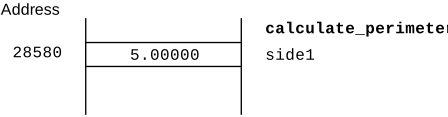
Partial schematic memory diagram for program perim-area-1showing part of the stack frame for the functionperimeter.
-
Use the address information from the inserted print statements to annotate the memory diagrams from Step 1a with the actual locations or addresses where each parameter and variable was stored. Rather than write the entire hexadecimal address, you may write the last four digits of each address.
-
Following the approach of
the previous lab, draw a
schematic diagram of main memory after the
function
Program
perim-area-1.c
computed perimeter and area in two separate functions, because each
function can only return one value. To obtain more than one result
from a function, we have to change the nature of the parameters, as
illustrated in the next exercises.
Passing Values and Addresses as Parameters
Be sure you have completed the reading on passing values and addresses as parameters before continuing with this lab!
-
Copy
perim-area-2.c, compile and run it, and check that it produces exactly the same output asperim-area.1.cTo understand how
perim-area-2.cworks, several print statements have been added to yield programperim-area-2a.c. Compile and run this program.When the program was run on one machine, the program generated the following output:
working with a rectangle of width 7.000000 and length 5.000000
compute:  addresses, values, and pointer references
             side1:  address: 640370600, value: 5.000000
             side2:  address: 640370592, value: 7.000000
   lengthPlusWidth:  address: 640370616, value: 12.000000
   pPerimeter:       address: 640370584, value: 640370664, *perimiter: 24.000000
   pArea:            address: 640370576, value: 640370656, *area: 35.000000
the rectangle's perimeter is 24.000000
the rectangle's area is 35.000000
main:  variable addresses and values
   length:      address: 640370680, value: 5.000000
   width:       address: 640370672, value: 7.000000
   perimeter:   address: 640370664, value: 24.000000
   area:        address: 640370656, value: 35.000000
This information gives rise to the following diagram for main memory that would have been encountered immediately before the
computeprocedure finished.
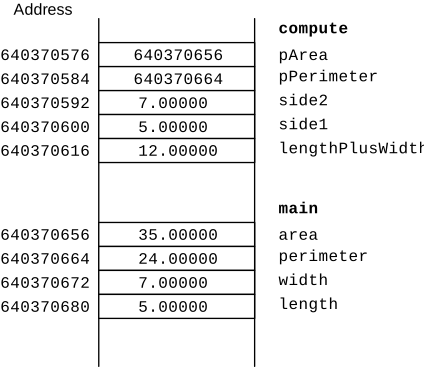
Schematic memory diagram for perim-area-2.cwith functioncomputeas the active stack frame.
As we shall discover later in the course, each
doublerequires 8 units (technically called bytes) of memory, so many of the locations given are 8 numbers apart.-
Explain why the values stored in main memory
for
side1andside2duplicate the numbers stored in main memory forlengthandwidth, respectively. -
The
printfstatement involvingpPerimeterincomputeindicates-
the address of
pPerimeter(i.e.,&pPerimeter) is640370584; that is the variablepPerimeteris stored at location640370584 -
the value stored for
pPerimeteris640370664; note that this is the location of theperimvariable inmain -
the value referenced by the location stored
in
pPerimeter(i.e., the value stored inperimeter) is24.00000.
area. -
the address of
-
Explain why the values stored in main memory
for
-
In the previous lab, you wrote two
functions that computed the circumference and the area of a circle.
Write a new version of your solution, so that the program has just
one procedure
compute_circle_geometrythat has three parameters, the radius of a circle, the circumference, and the area. Your function should have avoidreturn type, but takes the radius as input and returns the circumference and area as changed parameters. (That is, you will need to pass in the addresses of the circumference and area variables from yourmainprocedure.) -
Copy the program
pointers-1.cto your account.- Examine the program and predict the output it will produce.
- Compile and run this program. Verify your prediction and explain each value printed.
-
Draw a schematic memory diagram, showing variables and their
values just before
pointersFunctionOnefinishes and returns.
-
Copy the program
pointers-2.cto your account.- Examine the program and predict the output you expect it to produce.
- Compile and run the program. Verify your prediction and explain each value printed.
-
Using this output as an aid, draw a schematic memory diagram,
showing variables and their values just
before
pointersFunctionTwofinishes and returns. -
Add the declaration
int w = 100;as the first statement in themainprocedure (before the declarationint x = 3;).- How do you predict the output will change?
-
Compile and run the program. Note that you will
need to do so manually to get past the warnings:
clang -o pointers-2 pointers-2.c
Verify your prediction and explain each value printed. -
Does the result depend upon the value assigned
to
w? Why or why not?
-
Add the declaration
int z = 25;immediately after the declaration of variableyinmain.- How do you predict the the output will change?
- Manually compile and run the program. Verify your prediction and explain each value printed.
-
Does the result depend upon the value assigned
to
z? Why or why not?
-
Copy the program
pointers-3.cto your account.- Examine the program and predict the output it will produce.
- Compile and run this program. Verify your prediction and explain each value printed.
-
Draw a schematic memory diagram, showing variables and their values just
before
pointersFunctionThreeInnerfinishes and returns.
For those with extra time
Setting a Max
Write the function
void
set_max (int n, int m, int * p_max);
that sets the variable pointed to by p_max to the
larger of n and m.
Dividing the time
Write the function
void
split_time (unsigned long total_seconds, unsigned int* p_hours,
            unsigned int * p_minutes, unsigned int * p_seconds);
where total_seconds is a time represented as the number of
seconds since midnight. The other parameters are pointers to variables
in which the function will store the equivalent time in hours (0-23),
minutes (0-59) and seconds (0-59), respectively.
Exchange
Write the function
void
exchange ( double * p, double * q);
where p and q are pointers to two values
that are exchanged after the procedure is run. For example,
double a = 543.21;
double b = 123.45;
exchange (&a,&b);
printf ("a=%lf, b=%lf\n",a,b);
should print
a=123.45, b=543.21
