Program Management: Header files and make
Background
As programs grow more complex, with various pieces responsible for different operations and portions of the data, it becomes difficult to manage the complexity and understand everything in one program file. Moreover, changes to one piece may not have any thing to do with changes in other pieces. Thus, we may also speed the compilation process by separating portions of the program into cohesive units so that when changes are made, only the affected subunits must be recompiled.
Textbook Reading
Begin with a reading from your textbook:
- King: Chapter 15, pp. 349-371
Reorganizing the namelist.c Program
In previous the previous lab
on Linked Lists you worked
with a
program namelist.c that
just stores a name and next pointer in each node. That is, a node
contains a character array and next field:
/* Maximum length of names */
#define MAXSTRLEN   127

typedef struct node node_t;

struct node
{ char data[MAXSTRLEN+1];
  node_t* next;
};
The program namelist.c contains all components of the
linked-list code in a single file. Specifically, this program
contains:
- definition of a list node,
- function prototypes for all list operations,
- implementation of all list operations, and
-
a
maindriver function providing a user interface and tying all the above pieces together.
While such a monolithic framework works fine for small projects, the use of a single file for an entire program has several drawbacks:
- a single file requires a long time to compile,
- only one developer at a time can work on the program file,
- a change in one part of the program requires recompilation of the entire program, and
- individual procedures or segments of the program cannot be easily reused in other programs without copying and recompiling.
In C (and other languages), such problems are resolved following a two-pronged approach:
- A program is divided into multiple files.
- Compiling is automated, so that multiple files can be compiled as needed using a simple command.
Dividing namelist.c Into Pieces
Because namelist.c contains several independent
components, a separate program file could be defined for each
component. The relevant files and their dependencies are shown
below:
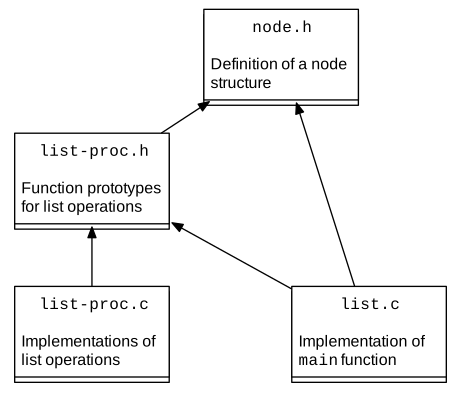
As this diagram indicates, the original namelist.c
program may be divided into the following four components:
-
File
node.h: definition of a list node -
File
list-proc.h: function prototypes for all list operations -
File
list-proc.c: implementation of all list operations -
File
list.c: the main program
The source files for all of these files may be found in this directory.
Within this structure, node.h is independent of the
others. However, information about a node structure is needed
elsewhere, so that both list.h and list.c
contain references to node.h
in #include directives. Similarly,
both implementation files (list-proc.c
and list.c) reference list operations, so both contain
references to list-proc.h.
Technically, you may have noted that list-proc.h includes
node.h, so an explicit inclusion of node.h in
list.c is unnecessary. However, in such a distributed
structure of files, it is not uncommon that some definitions are
referenced in several places. (A programmer could track down all
possible references, but this may undermine some of the advantages of
dividing the program into pieces.)
Unfortunately, this multiple referencing of a file could mean that a
definition is made twice in a program, which your compiler will
object to. To resolve this problem,
node.h contains
these lines wrapping the beginning and end of the file:
#ifndef __NODE_H__
#define __NODE_H__

...

#endif
In C, files can define identifiers for the preprocessor, and the
preprocessor can check whether an identifier has been previously
defined. For example, the identifier MAXSTRLEN is
defined as the number 127 for a global constant, just as was done in
previous programs. However,
in node.h, a new
identifier __NODE_H__ also is defined. With this new
identifier, when a file first references node.h, the
identifier __NODE_H__ will not have been defined. The
test #ifndef asks the preprocessor
whether an identifier is not defined, and in this case processing
continues within the
#ifndef directive. This first call,
therefore, defines identifier __NODE_H__. With any
subsequent references to node.h,
identifier __NODE_H__ will have been defined, so
processing within the #ifndef
directive will not happen a second time.
We have taken the same course within
list-proc.h.
Compiling the Pieces
With this structure, the header files node.h and
list-proc.h contain definitions, but do not yield any
code directly. Files list-proc.c
and list.c, however, must be compiled. Because these
files are independent, they can be compiled in either order, with the
commands:
clang -c list-proc.c
clang -c list.c
Here the -c flag tells the compiler to produce a
machine-language or object file, but not to expect the
whole program to be present. The resulting files have a
.o extension.
These pieces then can be linked together with the command:
clang -o list list.o list-proc.o
Alternatively, if main.c is to be compiled after
list-proc.c, then compiling and linking of
list.c can be done in one step. The resulting commands
are:
clang -c list-proc.c
clang -o list list.c list-proc.o
As this example illustrates in the second line, the
main .c program (to be compiled) is given before any
object files on the command line.
make and Makefiles
While the division of software into multiple files can ease
development, the manual compiling all of the pieces can be tedious.
GNU platforms provides a
make capability to automate this process, where
instructions for compiling are given in a file
called Makefile. Here is one version of such a
Makefile.
While this program is slightly more complex than is absolutely
necessary, this version shows several common elements of many
Makefiles. Running this twice at a workstation provides
the following interaction.
make
clang -g -Wall -Werror -std=c11 -c list.c
clang -g -Wall -Werror -std=c11 -c list-proc.c
clang -o list list.o list-proc.o
make
make: Nothing to be done for `all'.
As this example illustrates, the program make, using
specifications in a Makefile, keeps track of what needs
to be done to compile and link the designated files. Work occurs
only as needed. Thus, the first time make was run, both
programs were compiled and the resulting object files linked.
However, the second time make was run, the machine
detected that no files had changed from the first time, so no further
work was needed. To expand on this point, if
file list-proc.c were changed, but no other changes were
make, running make might produce the following:
make
clang -g -Wall -Werror -std=c11 -c list-proc.c
clang -o list list.o list-proc.o
Here, nothing related to file list.c had changed, so
that was not recompiled. More generally, make reviews
the status of all relevant files and compiles and links only those
that are out of date.
With this overview of make, we now look at the
Makefile instructions more carefully. While comments
are very helpful for documentation, general processing in a
Makefile has three components: dependencies,
rules, and macros.
Comments in a Makefile begin with the
character #. The comment continues for the rest of the
line, as in bash or csh shell programming.
Dependencies within Makefiles indicate which
files depend on which. In the example, these dependencies are given
by:
all: list
list: list.o list-proc.o
list.o: list.c node.h list-proc.h
list-proc.o:  list-proc.c list-proc.h node.h
After the first line, each line indicates which other files are needed in order to compile or link the given resulting file. The target file is given first, followed by a colon, and the required files follow.
The first line in the example actually has a similar purpose,
although this first line also provides the primary target or goal for
the entire process. In the case at hand, we might have moved
the list: line to the top of the file. However, we
wanted to specify some other information early as well, so this
placement of list: would have been awkward. Instead, we
used the dummy target all, and specified that this
target would depend on our real goal: list. (If we had
wanted several final program files, all of them could have been
listed here.)
Rules specify what command(s) must be given to create the desired targets. In the example, we could have used the following rules, one for each actual file to be created:
clang -g -Wall -Werror -std=c11 -c list.c
clang -g -Wall -Werror -std=c11 -c list-proc.c
clang -o list list.o list-proc.o
Typing Note: By convention, such rules must begin with a tab character.
Macros: While such explicit specification of commands works
fine within a Makefile, this approach sometimes may
cause trouble if the software is to be compiled and linked on
multiple platforms. To anticipate such matters, it is common to
use macros to specify various compiling details. Then, if the
files are moved to other systems, only the macros need be
changed—not the entire Makefile.
In the example at hand, we specify both which C compiler to use
(clang) and what flags to use for that compiler
(e.g., -Wall). Such macros are defined at the start of the
example
Makefile.
CC = clang
CFLAGS = -g -Wall -Werror -std=c11
Each of these lines defines a new variable that can be used later. As in C-shell programming, referencing these variables is achieved by preceding the variable name with a dollar sign $. Parentheses also are allowed, as illustrated in the example.
$(CC) -o list list.o list-proc.o
$(CC) $(CFLAGS) -c list.c
$(CC) $(CFLAGS) -c list-proc.c
Cleaning up your Directory: In addition to compiling a
program, the very last line of the Makefile defines rule
to clean your directory, deleting
unneeded .o files and emacs backups to
your .c programs. When you have finished working on
your program, you can accomplish this clean up with the command:
make clean
Variables
Beyond these basic capabilities, make and
Makefiles allow many additional features. The
pieces covered up to this point may be adequate for many common
applications. However, make recognizes some additional
variables (called automatic variables) that are useful in
writing some recipes.
| Automatic Variable | Meaning |
|---|---|
$@ |
the target of the rule |
$< |
the first prerequisite for the rule |
$^
| the collection of all prerequisites, separated by spaces |
These abbreviations are perhaps awkward and hard to remember. The
most useful is likely $^, as one does not have to repeat all of
the pre-requisites on the line for compiling.
Using these automatic variables, the three rules
list: list.o list-proc.o
	$(CC) -o list list.o list-proc.o
list.o: list.c node.h list-proc.h
	$(CC) $(CFLAGS) -c list.c

list-proc.o:  list-proc.c list-proc.h node.h
	$(CC) $(CFLAGS) -c list-proc.c
may be abbreviated
list: list.o list-proc.o
	$(CC) -o $@ $^
list.o: list.c node.h list-proc.h
	$(CC) $(CFLAGS) -c $<

list-proc.o:  list-proc.c list-proc.h node.h
	$(CC) $(CFLAGS) -c $<
A concise example
The
example Makefile
described above has copious illustrations and comments. The
short example below provides a concise template.
# File:          Makefile
# Author:        Henry M. Walker
# Created:       20 April 2008
# Simplified:    18 November 2011
# Acknowledgement:  adapted from an example by Marge Coahran
#----------------------------------------------------------------------------
# Disable the use of implicit build rules
.SUFFIXES:

# Use the clang compiler
CC = clang

# Set preprocessor flags
CPPFLAGS =

# Set compilation flags
#   -g          include debugging information
#   -Wall       report all warnings
#   -Werror     treat warnings as errors [note: compiler dependent]
#   -std=c11    use the 2011 version of the C standard
CFLAGS = -g -Wall -Werror -std=c11

# Set linker flags
LDFLAGS =
#----------------------------------------------------------------------------
# build rules:
#
# Each rule takes the following form  (Note there MUST be a tab,
# as opposed to several spaces, preceeding each command.
#
# target_name:  dependency_list
#	command(s)

all: list

# List program components, what they depend on, and how to compile or link each

list:  list.o list-proc.o
	$(CC) $(LDFLAGS) -o $@ $^

list.o:  list.c node.h list-proc.h
	$(CC) $(CPPFLAGS) $(CFLAGS) -c $<

list-proc.o:  list-proc.c list-proc.h node.h
	$(CC) $(CPPFLAGS) $(CFLAGS) -c $<

#----------------------------------------------------------------------------
# cleanup rules: To invoke this command, type "make clean".
# Use this target to clean up your directory, deleting (without warning)
#   the built program, object files, old emacs source versions, and core dumps.

clean:
	rm -f list *.o *~ core*
Further Reading
For further any information you may desire about make,
extensive documentation may be found through the online
GNU make
Manual, published by the Free Software Foundation.
