Testing
This reading discusses several elements of program correctness and testing:
- the specification of procedures using pre- and post-conditions,
- philosophies behind checking or not testing post conditions,
-
the use of the
assertprocedure - a frame of mind for testing,
- choosing test cases,
Introduction
We begin with a short program and simple question: Is the following program correct?
/* a simple C program */
#include <stdio.h>

/* Declare conversion constant */
/* const tells C compiler this variable may not be changed */
const float CONVERSION_FACTOR = 1.056710f;   /*quarts to liters */

int
main (void)
{
  /* input */
  float quarts, liters;
  int numAssigned;
  printf ("Enter a value:  ");
  numAssigned = scanf ("%f", &quarts);

  /* validate input */
  if (numAssigned == 0) {
    printf ("Error: Unable to read number\n");
    return 1;
  } else if ( quarts < 0) {
    printf ("Error: Cannot have a negative quantity");
    return 1;
  }

  /* process value read */
  liters = quarts / CONVERSION_FACTOR;

  /* output */
  printf ("Result: %f quarts = %f liters\n", quarts, liters);

  return 0;
}  // main
The answer is "Maybe—the program may or may not be correct"; to expand, the correctness of this program depends upon what problem is to be solved.
The program is correct, IF
- one is trying to convert a value in quarts to the corresponding value of liters, AND
-
floatdata type has adequate precision.
However, the program is incorrect otherwise:
- The program likely is not correct if we want 25 digits of accuracy in the answer.
- The program certainly is not correct if the problem was to determine whether or not it will rain tomorrow.
Point: Discussions about problem solving and the correction of solutions depend upon a careful specification of the problem.
Pre- and Post-Conditions
In order to solve any problem, the first step always should be to develop a clear statement of what initial information may be available and what results are wanted. For complex problems, this problem clarification may require extensive research, ending in a detailed document of requirements.
One Grinnell faculty member has commented on seeing requirements documents for a commercial product that filled 3 dozen notebooks and occupied about 6 feet of shelf space. However, noted software engineering professor Mark Ardis has quipped that
A specification that will not fit on one page of 8.5x11 inch paper cannot be understood.1
Undoubtedly, we need to know what is expected, even for simple problems.
Within the context of introductory courses, assignments often give reasonably complete statements of the problems under consideration, and a student may not need to devote much time to determining just what needs to be done. In real applications, however, software developers may spend considerable time and energy working to understand the various activities that must be integrated into an overall package and to explore the needed capabilities.
Once an overall problem is clarified, a natural approach in Scheme or C programming is to divide the work into various segments — often involving multiple procedures or functions. For each code segment, procedure, or function, we need to understand the nature of the information we will be given at the start and what is required of our final results. Conditions upon initial data and final results are called pre-conditions and post-conditions, respectively.
- Pre-conditions are constraints on the types or values of its arguments, or other circumstances that must hold for correct operation.
- Post-conditions specify what should be true at the end of a procedure. In Scheme or C, a post-condition typically is a statement of what a procedure should return, but it may also be a statement about what side-effects have occurred.
More generally, an assertion is a statement about variables at a specified point in processing. Thus, a pre-condition is an assertion about variable values at the start of processing, and a post-condition is an assertion at the end of a code segment.
It is good programming style to state the pre- and post-conditions for each procedure or function as comments.
Pre- and Post-Conditions as a Contract
One can think of pre- and post-conditions as a type of contract between the developer of a code segment or function and the user of that function.
- The user of a function is obligated to meet a function's pre-conditions when calling the function.
- Assuming the pre-conditions of a function are met, the developer is obligated to perform processing that will produce the specified post-conditions.
As with a contract, pre- and post-conditions also have implications concerning who to blame if something goes wrong.
- The developer of a function should be able to assume that pre-conditions are met.
-
If the user of a function fails to satisfy one or more of its pre-conditions, the developer of a function has no obligations whatsoever—the developer is blameless if the function crashes or returns incorrect results.
The Software Engineering Code of Ethics and Professional Practice tempers this hyperbolic assertion somewhat:
Approve software only if they have a well-founded belief that it is safe, meets specifications, passes appropriate tests, and does not diminish quality of life, diminish privacy or harm the environment. The ultimate effect of the work should be to the public good.
- If the user meets the pre-conditions, then any errors in processing or in the function's result are the sole fault of the developer.
Example: The Bisection Method
Suppose we are given a continuous function f, and we want to approximate a value r where f(r)=0. While this can be a difficult problem in general, suppose that we can guess two points a and b (perhaps from a graph) where f(a) and f(b) have opposite signs. The four possible cases are shown below:
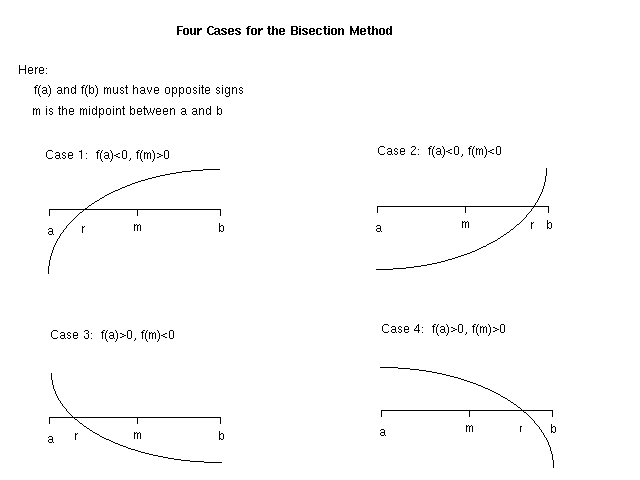
We are given a and b for which f(a) and f(b) have opposite signs. Thus, we can infer that a root r must lie in the interval [a, b]. In one step, we can cut this interval in half as follows. If f(a) and f(m) have opposite signs, then r must lie in the interval [a, m]; otherwise, r must lie in the interval [m, b].
Finding Square Roots
As a special case, consider the function f(x) = x2 - a. A root of this function occurs when a = x2, or x = √a. Thus, we can use the above algorithm to compute the square root of a non-negative number. A simple program using this bisection method follows:
/* Bisection Method for Finding the Square Root of a Positive Number */

#include <stdio.h>

const double ACCURACY = 0.0001;  /* desired accuracy of result */

int
main (void)
{
  /* pre-conditions:  t will be a positive number
   * post-conditions:  code will print an approximation of the square root of t
   */

  double value;        /* we approximate the square root of this number */
  double left, right, midpoint;  /* root will be in interval [left,right] */

  /* for f(x) = x^2 - t, differences represent values
     f(left), f(right), and f(midpoint) */
  double diffLeft, diffRight, diffMid;

  int numAssigned; /* return value for user input from scanf */

  /* Getting started */
  printf ("Program to compute a square root\n");
  printf ("Enter positive number: ");
  numAssigned = scanf ("%lf", &value);

  /* Validate user input */
  if (numAssigned == 0) {
    printf ("Error: Unable to read number\n");
    return 1;
  } else if ( value <= 0) {
    printf("Error: A positive number is required; %lf was entered.\n", value);
    return 1;
  }

  /* Set up initial interval for the bisection method */
  left = 0;
  right = (value < 2.0 ? 2.0 : value );

  diffLeft = left*left - value;
  diffRight = right*right - value;

  /* Iterate interval shrinking until sufficiently small */
  while ( (right - left) > ACCURACY)
  {
    midpoint = (left + right) / 2.0;  /* midpoint of range [left,right] */

    diffMid = midpoint*midpoint - value;

    if (diffMid == 0.0) break;  /* stop loop if we have the exact root */

    if ((diffLeft * diffMid) < 0.0) {
      /* f(left) and f(mid) have opposite signs */
      right = midpoint;
      diffRight = diffMid;
    } else {
      left = midpoint;
      diffLeft = diffMid;
    }
  } // while

  printf ("The square root of %lf is approximately %lf\n", value, midpoint);
  return 0;
} // main
As this program indicates, the program assumes that we are finding the square root of a positive number: thus, a pre-condition for this code is that the data entered will be a positive number. At the end, the program prints an approximation to a square root, and this is stated as a post-condition.
To Test Pre-Conditions or Not?
Although the user of a function has the responsibility for meeting its pre-conditions, computer scientists continue to debate whether functions should check that the pre-conditions actually are met. Here, in summary, are the two arguments.
- Pre-conditions should always be checked as a safety matter; a function should be sufficiently robust that it will detect variances in incoming data and respond in a controlled way.
- Since meeting pre-conditions is a user's responsibility, a developer should not add complexity to a function by handling unnecessary cases; further, the execution time should not be increased for a responsible user just to check situations that might arise by careless users.
Actual practice tends to acknowledge both perspectives in differing contexts. More checking is done when applications are more critical. As an extreme example, in software to launch a spacecraft or administer radiation to a patient, software may perform extensive tests of correctness before taking an action—the cost of checking may be much less than the consequences resulting from unmet pre-conditions.
As a less extreme position, it is common to check pre-conditions once—especially when checking is relatively easy and quick, but not to check repeatedly when the results of a check can be inferred.
The assert function in C
At various points in processing, we may want to check that various
pre-conditions or assertions are being met. C's assert
utility serves this purpose.
The assert function takes a Boolean expression as a
parameter. If the expression is true, program execution continues.
However, if the expression is false, assert discovers
the undesired condition, and regular execution is halted with an
error message.
The assert utility should not be used
for checking user input. As you should have noticed, a failed
assertion causes a program to exit rather ungracefully. Instead,
assertions should be used to verify assumptions about the state of
the program during development and/or debugging.
Note that using assert in your code will require your
program file to
#include <assert.h>.
Example
For our square root example, two types of assertions initially come to mind.
- The user is expected to enter a positive number; entering zero or a negative number violates the contract of the program—the pre-condition.
- During processing, numbers a and b are supposed to be endpoints of an interval, over which the function f(x) = x*x - t changes sign. The bisection method fails if f(a) and f(b) have the same sign.
Because calculating the square root is an algorithm well-suited to a
stand-alone function that can be more directly tested, we can factor
the bisection into its own function. This leaves us to handle bad
user input more gracefully in main while testing the
other two conditions with assertions within a separate
square_root function.
/* Bisection Method for Finding the Square Root of a Positive Number */

#include <stdio.h>
#include <assert.h>

const double ACCURACY = 0.0001;  /* desired accuracy of result */

/* square_root - Calculate the square root of a positive number
 *
 *  pre-conditions:  value>0
 *  post-conditions:  returns m such that |m*m - t| <= ACCURACY
 */
double
square_root (double value)
{
  double left, right, midpoint;  /* root will be in interval [left,right] */

  /* for f(x) = x^2 - t, differences represent values
     f(left), f(right), and f(midpoint) */
  double diffLeft, diffRight, diffMid;

  /* Set up initial interval for the bisection method */
  left = 0;
  right = (value > 2.0 ? 2.0 : value );

  diffLeft = left*left - value;
  diffRight = right*right - value;


  /* Iterate interval shrinking until sufficiently small */
  while ( (right - left) > ACCURACY)
  {
    /* f(x) = x^2 - t must have opposite signs at f(left) and f(right) */
    assert (diffLeft * diffRight < 0);

    midpoint = (left + right) / 2.0;  /* midpoint of range [left,right] */
    diffMid = midpoint*midpoint - value;

    if (diffMid == 0.0) break;  /* stop loop if we have the exact root */

    if ((diffLeft * diffMid) < 0.0) {
      /* f(left) and f(mid) have opposite signs */
      right = midpoint;
      diffRight = diffMid;
    } else {
      left = midpoint;
      diffLeft = diffMid;
    }
  } // while

  return value;

} // square_root


/* Prompt the user for a number, calculate and print its square root */
int
main (void)
{
  double square;        /* we approximate the square root of this number */
  double root;
  int numAssigned;      /* return value for user input from scanf */

  /* Getting started */
  printf ("Program to compute a square root\n");
  printf ("Enter positive number: ");
  numAssigned = scanf ("%lf", &square);

  /* Verify user input */
  if (numAssigned == 0) {
    printf ("Error: Unable to read number\n");
    return 1;
  } else if (square <= 0) {
    printf ("Error: A positive number is required; %lf was entered.\n", square);
    return 1;
  }

  /* Calculate result */
  root = square_root (square);
  printf ("The square root of %lf is approximately %lf\n", square, root);

  return 0;
} // main
When a user runs this program entering the value -2, the
program prints the expected error message:
A positive number is required; -2.000000 was entered.
However, when a user runs the program with 5,
the program stops abruptly, printing:
bisection-assert: bisection-assert.c:34: square_root: Assertion `diffLeft * diffRight < 0' failed.
          Aborted
This version of the algorithm has a subtle error in it; the assertion has potentially helped us to identify it more easily. As it turns out, there is a subtle error in the section of code initializing the interval. After reading again through the comments establishing the variable values, can you isolate it? (If not, we will learn in another class to use a debugger that will allow us to probe the variables interactively while our program runs.)
If you do fix the error and re-run the program with the
value 2, you should see the following expected output.
The square root of 2.000000 is approximately 1.414246
Disabling assert Statements
Because assertions can take some time and effort to create but may
cause problems during "normal" (i.e., non-debugging) executions of a
program, they can be disabled
by #defineing NDEBUG
before assert.h
is #included or (equivalently)
including -DNDEBUG flag in the compile command.
When invoking the compiler directly, you could do this as follows.
clang -DNDEBUG -o bisection-assert bisection-assert.c
When using the make utility, however, you need to
explicitly send this flag to the preprocessor, by setting
the CPPFLAGS variable in the make
command. (If you decided to look at it more closely, you'd see that
our default Makefile appends its own flags to this
variable with the += operator, otherwise the command
line flags would overwrite these other values necessary for building
programs using the robots.) You can do this as follows.
make CPPFLAGS=-DNDEBUG bisection-assert
You can set different or additional flags as well
(e.g., -DTESTING). When we learn more about the
preprocessor soon, you will learn how to use your own such
compile-time code modifiers.
A "Testing" Frame of Mind
Once we know what a program is supposed to do, we must consider how we know whether it does its job. There are two basic approaches:
- Verification: Develop a formal, mathematical proof that the program always does exactly what has been specified.
- Testing: Run the program with a range of data, in each case checking the results with what we know to be correct.
Although a very powerful and productive technique, formal verification suffers from several practical difficulties:
- We must be able to specify formally all pre- and post-conditions, and this may require extensive development.
- Formal proof techniques require extensive development and are beyond the scope of this course.
- Formal verification typically assumes that compilers are correct—an assumption that sometimes is incorrect.
Altogether, for many programs and in many environments, we often try to infer the correctness of programs through testing. However, it is only possible to test all possible cases for only the simplest programs. Even for our relatively-simple program to find square roots, we cannot practically try all possible positive, double-precision numbers as input.
Our challenge for testing, therefore, is to select test cases that have strong potential to identify any errors. The goal of testing is not to show the program is correct—there are too many possibilities. Rather, the goal of testing is to locate errors. In developing tests, we need to be creative in trying to break the code; how can we uncover an error?
Choosing Testing Cases
As we have discussed, our challenge in selecting tests for a program centers on how to locate errors. Two ways to start look at the problem specifications and at the details of the code:
- Black-Box Testing:
- The problem is examined to determine the logical cases that might arise. Test cases are developed without reference to details of code.
- White-Box Testing:
- Code is examined to determine each of the possible conditions that may arise, and tests are developed to exercise each part of the code.
A list of potential situations together with specific test data that check each of those situations is called a test plan.
A Sample Test Plan
To be more specific, let's consider how we might select test cases for the square-root function.
- Black-box Testing of the Square-Root Program
-
Since we can choose any values we wish, we will choose values for
which we already know the answer. Often we choose some small
values and some large ones.
- Input: 0.25 (answer should be 0.5 — (1/2)2 is 1/4)
- Input: 9 (answer should be 3)
- White-box Testing
-
We want to exercise the various parts of the code.
The program sets b (right) to 2 when finding the square root of a small number, so we want to cover that case:- Input: 0.25 (from above — value smaller than 1)
- Input: 1.44 (1.2 squared — value larger than 1, but smaller than 2)
right)to t (value) for larger numbers, and we want to cover that case:- Input: 9 (from above)
- Input: 1 (should reach this result on the first iteration)
-
Input: 16 (should reach this result when b
(
right) moves from 16 to 8 to 4)
right), so we want input that guarantees we will check both of those code segments.-
Input: 0.25 (for numbers smaller than 1, the square root is
larger than the number, so a (
left) will have to move rightward in the loop) -
Input: 9 (for numbers larger than 1, the square root is smaller
than the number, so b (
right) will have to move leftward in the loop)
Putting these situations together, we seem to test the various parts of the code with these test cases:
- Input: 0.25
- Input: 1
- Input: 1.44
- Input: 9
- Input: 16
Each of these situations examines a different part of typical processing. More generally, before testing begins, we should identify different types of circumstances that might occur. Once these circumstances are determined, we should construct test data for each situation, so that our testing will cover a full range of possibilities.
Footnotes
1 Bentley, J. (1985) Programming Pearls: Bumper-Sticker Computer Science. In Communications of the ACM, 28(9), 896–901.
