Summary: In this lab, you will implement a specialized in-order traversal in order to produce a graph of a tree.
Preparation
-
Create a directory for this lab:
mkdir somewhere/tree
-
Go to your new directory:
cd somewhere/tree
-
Copy the files for this lab:
  cp ~weinman/public_html/courses/CSC207/2011S/labs/code/tree/TreeGrapher.java .
  cp ~weinman/public_html/courses/CSC207/2011S/labs/code/tree/BinaryTree.java .
  cp ~weinman/public_html/courses/CSC207/2011S/labs/code/tree/BinaryNode.java .
This should place a graphics class and two modified data structure classes into your directory.
Background
A graphical version of a binary tree can be generated automatically with a relatively simply program by assigning an x,y coordinate to each node. We can then draw a circle at each node's coordinate, and connect each non-root node to its parent with a line between their coordinates. So where do these coordinates come from?
We want the left-most node to have the smallest x-coordinate (0), and the right-most node to have the largest (N - 1, where N is the number of nodes in the tree). The parent of the left-most node should be immediately to the right of it, suggesting an x-coordinate of 1. Continuing in this fashion, we see that the x-coordinate should be the number corresponding to the node's "index" in an in-order traversal.
In most graphics coordinate systems, the origin is in the upper-left corner of the frame. Thus, 0 is the top, and H, the height of the tree, should be at the bottom. What should the root's y-coordinate be? If the root is at the top, presumably its y-coordinate is zero. What about the root's children? Their y-coordinate should be 1. What is the y-coordinate of an arbitrary node? Its depth in the tree.
In this lab, some drawing primitives will be provided for you. Your task will be to calculate the coordinates of a node by writing recursive routines to find the depth and in-order traversal number of every node. With these, you will use the drawing commands provided to add circles and lines to a graph for displaying the tree.
To successfully complete this lab, carefully read all the instructions, above and below.
Exercises
Exercise 1
The fileTreeGrapher.java contains the following two
routines for indicating where to draw tree nodes and how to connect
them. Study the documentation to be sure you understand how these
methods work.
/** Add circle at a particular coordinate with a label
 *
 * @param x x-coordinate of circle (i.e., in-order traversal number)
 * @param y y-coordinate of circle (i.e., depth)
 * @param label Associated text to print with circle
 *
 * @return Unique identifier of circle
 */
public int addCircle(int x, int y, String label);

/** Add line to connect two circles
 *
 * @param i Identifier of first circle to connect with a line
 * @param j Identifier of second circle to connect with a line
 *
 * @throws IllegalArgumentException if either circle identifier is invalid
 */
public void addLine( int i, int j);
Exercise 2
Note: This exercise only involves some reading and understanding. You will not be writing any code.-
Open the file
BinaryTree.java. This is a modified version of the version from the textbook (Figure 18.13, p. 662). -
Find the method
drawTree. Simply note it has three calls to methods on the root node. The first calculates the depth of the root and all its children. The second calculates the in-order traversal number of the root and all its children. The third generates the drawing using the two values just calculated. Your job (eventually) will be to implement these methods. -
Compile
BinaryTree.java(in Emacs, use C-c C-v C-c). -
The class
TreeGrapherhas a static method calledstartthat is called fromBinaryTree.main(). This routine takes aBinaryTreeobject, calls thedrawTreemethod and generates a window containing the tree. Thus, all you will need to do is construct a tree (one is provided already) and call this method. That is, after you implement the methods called in the step above. The default tree looks like this (which will eventually be the result of your program).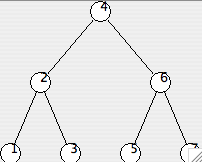
-
Compile
TreeGrapher.java(in Emacs, use C-c C-v C-c).
Exercise 3
-
Open the file
BinaryNode.java. Note that two private fields have been added,order, to store the in-order traversal number of a node, anddepth, to store the depth of a node in the tree. -
First we'll work on assigning a value to the depth. Locate the
method
assignDepthand study its documentation/specification. Pay careful attention to the meaning of the parameter and its value in the call to the root fromBinaryTree. - What should you do with the value passed as a parameter in order to store this in the node? (Recall the member variables pointed out earlier in this exercise.)
- Add a line to this method making the ppropriate assignment.
- This routine is to recursively calculate and assign depth to every node in the tree. If there is a left node, what recursive method call should be made? (Don't forget that in object-oriented programming, every method call has an object recipient. Think carefully about the recipient!) What should the value of the parameter be?
- Add lines to this method making the appropriate recursive call to a left child, if there is one.
- Add lines to this method making the appropriate recursive call to the right child, if there is one.
- Test your method by adding a print statement including the depth and element of the node.
-
Compile
BinaryNode.java(in Emacs, use C-c C-v C-c). -
Switch to the
BinaryTree.javabuffer and run it from emacs. (Use C-c C-v C-r). An empty window should appear. Your Emacs buffer should also split and show you the textual output of your program. -
If the depth output does not match the items in the tree above,
you will need to debug your
assignDepthmethod. Otherwise you will probably want to comment out your print statement.
Exercise 4
First we'll work on understanding how to assign a value to the in order traversal number (the member variableorder). Locate
the method assignInOrder and study its documentation.
-
Explain the meaning of the parameter to
assignInOrder. -
Find the value of the parameter used in the call to
assignInOrderfor the root node. Why is this the correct value? -
What should the value of the parameter
to
assignInOrderwhen the method is called for the node labeled "6" in the example tree above? When you and your partner agree, confirm your answer in the notes for this exercise. If you still do not understand, ask the assistant or instructor. -
Explain the meaning of the return value of
assignInOrder. -
What should be the return value of
assignInOrderwhen the method is called for the node labeled "2" in the example tree above? When you and your partner agree, confirm your answer in the notes for this exercise. If you still do not understand, ask the assistant or instructor.
Exercise 5
Now we have established the input toassignInOrder is
the value to start after and the return value is the ending
in-order traversal number of the subtree.
-
In
assignInOrder, declare a local variableendto store the "end" (largest) traversal number for this node (eventually, the value to be returned). - If there is NO left child, what then should the order be for this node? Add a conditional to test this and make such an assignment.
- If there IS a left child, you will need to recursively assign an order to it. What should the start value be for the recursive call?
-
The recursive call to a left child will return the largest
in-order traversal number for the left child's
subtree. Given that result, what should be the order
for this node?
Recall the study of example tree from the previous exercise. The
left child of node "4" is node "2". What value does node "2" return?
What, then, should be the value of
orderfor node "4"? -
Add the recursive call to process the left child, using the
appropriate start value, and appropriately
updating
this.orderwith the result returned. -
If there is no right child, what should the
end(return) value be? Add a test and assignment to handle this case. - If there is a right child, you must now recursively assign its order number, too. What should the start value be for the recursive call? (Remember, a right child comes after its parent in an in-order traversal).
-
The recursive call to a right child will return the largest
in-order traversal number for the right child's subtree. After
this call, what should the updated
end(return) value for this node be? - Add a line to update the end value and assign the order for the right child (using the appropriate start value), if there is one.
- Finally, return the largest in order traversal number of the sub-tree rooted at this node.
Exercise 6
-
Test your
addInOrdermethod by adding a print statement including the order number and element of the node. -
Compile
BinaryNode.java(in Emacs, use C-c C-v C-c). -
Switch to the
BinaryTree.javabuffer and run it from emacs. (Use C-c C-v C-r). An empty window should appear. Your Emacs buffer should also split and show you the textual output of your program. -
If the order output does not match the tree above, you will need
to debug your
assignOrdermethod. Otherwise you will probably want to comment out your print statement.
Exercise 7
Now we're in the homestretch and just need to add some simple graphing commands with a recursive traversal of the tree.-
Locate the method
addGraphNodeand study its documentation/specification. Recall that the methodaddCirclefromTreeGrapherreturns a circle identifier.. -
Recall what the x- and y-coordinates of a node
should be from the Background discussion at the beginning of this
lab. Write one line of code in this method to add a circle to
the
TreeGrapherobject with the appropriate coordinates. Use thetoStringmethod of theelementto create a label for the circle. Note the return value foraddGraphNode! - If there is a left child, you will need to recursively add a graph node for it. Add code to your method to do this.
- You then need to connect the circle for this node to the circle for the left child. How do you know the circle identifier for the left child?
-
Write code (using the
addLinemethod ofTreeGrapher) to connect this node's circle to its left child's circle. - If the node has a right child, you will need to repeat the process of adding a graph node for the right child and connecting it with a line. Add code to your method to accomplish this.
- Finally, be sure your method returns the proper value.
Exercise 8
-
Compile
BinaryNode.java(in Emacs, use C-c C-v C-c). -
Switch to the
BinaryTree.javabuffer and run it from emacs. (Use C-c C-v C-r). Now your window should appear with your tree. If the order and depth values were correct, and you used the correct coordinates when adding circles, your nodes should be in the right places. If you added lines connecting the appropriate circles, your lines should also be in the right places. If they are not, study the picture carefully and try to identify the errors in youraddGraphNoderoutine.
For Those with Extra Time
Add methods to theBinaryTree and BinaryNode
classes that implement Exercises 18.10 c, d, and e. Test each method
as you develop it by creating a driver class that builds some
appropriate trees to test in main. Note that for parts d
and e, you may assume that the
element IS-A Comparable.
Notes on the Exercises
Note on Exercise 4(c)
The parameter specifies what value the in-order traversal number is to start counting from. The left-most node has in-order number zero, which means the root will have an in-order number of 3. Thus, the node labeled "6" should start counting from 3, which should be the value of the parameter.Note on Exercise 4(e)
The return value indicates the largest in-order traversal number of the subtree rooted at the particular node. Because node 2 immediately follows the leftmost node, which has an in-order number of zero, the node labeled "2" has an in-order traversal number of 1. Noting that node 3 also immediately follows node "2", node "3" must therefore have an in-order traversal number of 2. This is the largest in-order traversal number in the sub-tree rooted at "2", therefore the methodaddInOrder called on the node labeled "2" should
return 2.
