Lab: Hard Disk Drives
CSC 213 - Operating Systems and Parallel Algorithms - Weinman
- Summary:
- You will experiment with I/O timing for a simulated
hard disk drive.
- Objectives:
-
- Practice computing seek, rotation, and transfer times for requests
- Understand the impact of seek rate, rotational delay, and scheduling
algorithm on I/O times
Exercises
Preliminaries
Do this laboratory on any MathLAN workstation. You don't need to copy
any starter files, simply change your working directory as follows.
-
$ cd ~weinman/public_html/courses/CSC213/2012F/labs/code/disk
Part A: Basics
- Compute the seek, rotation, and transfer times for the following requests.
The -G option launches the graphical interface, but you should
read the disk details from the terminal to do your calculations before
starting the simulator.
-
./disk.py -G -a 6
./disk.py -G -a 30
./disk.py -G -a 7,30,8
- Repeat the last request above, but using different seek rates.
- Use a seek rate of 10 distance units per time unit:
-
./disk.py -G -a 7,30,8 -S 10
- Use a seek rate of 0.1 distance units per time unit:
-
./disk.py -G -a 7,30,8 -S 0.1
How do the times change?
Part B: Scheduling
You may have noticed that some requests streams would be better served
with a policy other than FIFO.
- For the request stream 7, 30, 8, what order should the requests be
processed in?
- Using the shortest seek-time first (SSTF) disk scheduler what should
the seek, rotation, and transfer times be?
- Verify your answer:
-
./disk.py -G -a 7,30,8 -p SSTF
- Using the shortest access-time first (SATF) scheulder, what order
should these requests be serviced in?
- Find a set of rquests where SATF does noticeably better than STF;
what are the conditions for a noticeable difference to arise? (Be
prepared to discuss your answer with the class.)
Part C: Geometry
- Try the request stream 10, 11, 12, 13 with FIFO and the default parameters:
-
./disk.py -G -a 10,11,12,13
- This request is not handled particularly well. Why?
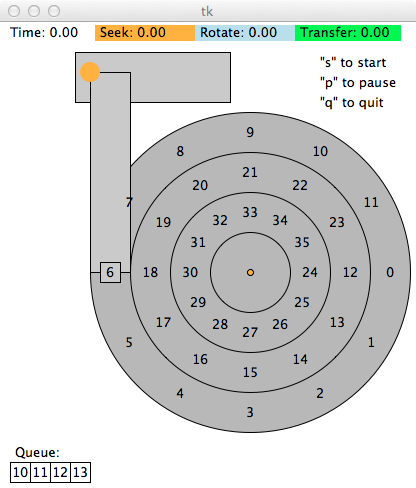
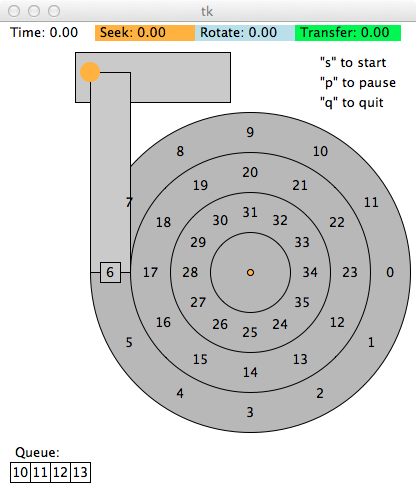
- The simulator includes a track skew option, measured in blocks. For
example, the simulation on the left shows the default skew of zero,
while the simulation on the right shows the a skew of one.
| Track skew = 0 | Track skew = 1 |
 |  |
Given the default seek rate, what should the skew be to minimize the
total time for this request? Why?
- Verify your answer:
-
./disk.py -G -a 10,11,12,13 -o skew
If you were wrong, revise your explanation, not just your number.
- What should the skew be if the seek rate is four distance units per
time unit?
For those with Extra Time
You may choose any one (or more) of the following exercises that interest
you.
Extra 1: Dense outer tracks
Multi-zone disks pack more blocks into the outer tracks. To configure
this disk in such a way, run with the -z flag.
- Specifically, try running some requests against a disk run with -z
10,20,30 (the numbers specify the angular space occupied by a block,
per track; in this example the outer track will be packed with a block
every 10 degrees, the middle track every 20 degrees, and the inner
track with a block every 30 degrees).
- Run some random requests (e.g., -a -1 -A 5,-1,0, which specifies
that random requests should be used via the -a -1 flag and
that five requests ranging from 0 to the max be gneerated), and see
whether you can compute the seek, rotation, and transfer times. Use
different random seeds (-s 1, -s 2, etc.).
- What is the bandwidth (in blocks per unit time) on the outer, middle,
and inner tracks?
Extra 2: Scheduling windows
Scheduling windows determine how many block requests a disk can examine
at once in order to determine which block to serve next.
- Generate some random workloads of a lot of requests (e.g., -A
1000,-1,0, with different seeds, perhaps) and see how long the SATF
scheduler takes when the scheduling window is changed form 1 up to
the number of requests (e.g., -w 1 up to -w 1000,
and some values in between).
- How big of scheduling window is needed to approach the best possible
performance?
Note: Use the -c flag and don't turn on the graphics
with -G to run these more quickly.
- When the scheduling window is set to 1, does it matter which policy
you are using?
Extra 3: Starvation
Avoiding starvation is important in a scheduler.
- Can you think of a series of requests such that a particular block
is delayed for a very long time given a policy such as SATF?
- Given that sequence, how does it perform if you use a bounded
SATF (BSATF) scheduling approach? In this approach, you
specify the scheduling window (e.g., -w 4, see prior problem
above) as well as the BSATF policy (-p BSATF); the scheduler
will then only move on to the next window of request when all
of the requests in the curent window have been serviced.
- Does this solve the starvation problem? How does it perform, as compared
to SATF?
- In general, how should a disk make this trade-off between performance
and starvation avoidance?
Extra 4: Greedy vs. Optimal
All the scheduling policies we havce looked at thus far are greedy,
in that they simply pick the next best option instead of looking for
the schedule over a set of requests. Can you find a set of requests
in which this greedy approach is not optimal?
- Acknowledgment:
- Exercises and disk.py from Operating
Systems: Three Easy Pieces ("Hard Disk Drives") by Remzi H.
and Andrea C. Arpaci-Dusseau.