Lab: Prolog
CSC261 - Artificial Intelligence - Weinman
- Summary:
- We explore writing programs and posing queries to the
GNU Prolog environment.
Preparation
- Make a directory for this lab.
-
mkdir somewhere/prolog
cd somewhere/prolog
- Open Emacs and create a new Prolog program called blocks.pl
in your new directory.
- In emacs, type
-
M-x prolog-mode
to change from Perl (the default for a pl extension) to Prolog
mode.
Exercises
Consider the blocks world shown below.
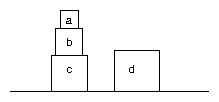
A: Facts
- Using the predicate on, and the names of the blocks as well
as table, define the ground facts for the blocks world above
in your prolog file blocks.pl.
- Save your file, start prolog, and load your program. Fix any syntax
errors. For example:
-
$ prolog
GNU Prolog 1.3.0
By Daniel Diaz
Copyright (C) 1999-2007 Daniel Diaz
- ?- ['blocks'].
compiling somewhere/prolog/blocks.pl for byte code...
somewhere/prolog/blocks.pl compiled, 8 lines read - 963 bytes written, 6 ms
yes
- ?-
Note that, like other shells, this prolog interpreter allows you to
use the up and down arrows to navigate through your command history.
- Test one on relationship you expect to be true and another
you expect to fail.
- Use a query to find a substitution that tells you what block a
is on.
- Use another query to find all substitutions that tell you all on
relations.
B: Rules
Next, we will define a predicate above(X,Y) to indicate whether
some block X is above another block Y in a single
stack.
-
What should the "base case" for this predicate
relation be? That is, what is the simplest (or most direct)
way for a block to be above another?
-
Write the body for this base form of the
rule using the head above(X,Y).
-
What should the "recursive case" for
this predicate be? That is, what if you had a stack of ten blocks?
How would you go about reasoning that the top one is indeed above
the bottom block?
-
Write the body for this recursive
form of the rule using the head above(X,Y).
- Save your file and re-load your program in your prolog shell. Fix
any syntax errors.
-
Test your "base case" of B.2.
For example
-
- ?- above(a,b).
true ?
At this point, prolog is waiting for you press return to terminate
the query. You could (don't do it yet!) type ; to continue
the search for another solution, or else you could type a
to print all solutions.
- What do you expect to happen if you type a?
- Verify your prediction.
- Test several other examples of this base case.
- Test your "recursive" case of B.4.
For example
-
- ?- above(a,c).
If prolog terminates with a stack overflow error, you haven't architected
your recursive case in such a way that the chaining can successfully
terminate. If you do not see how to fix this, review AIMA section
9.4.4. Remember that prolog tries to unify rule heads from top to
bottom (in the file) and atoms from left to right (in a rule body).
- Ask prolog to identify all the blocks above a. What
do you expect it to produce?
- Ask prolog to identify all the blocks below a for
you. What result do you expect? You will need to use the same interaction
commands mentioned in B.6.
- Ask prolog to identify all the blocks that are above one another.
C: Prolog Shell Responses: yes, no, true
Some folks are initially confused about the responses returned by
the prolog shell. Here we walk through a few examples to clarify the
different roles.
- When the interpreter shell reports true, the query was satisfied
without any variable substitutions to fill in. For example, try the
following query
-
- ?- above(a,b).
Because no substitutions in the query are necessary, it simply reports
true. But it also waits for your response to continue chaining.
- Type a to ask for all the remaining unifiers. What response
do you get?
- The answer means it has finished iterating (chaining) over all possible
unifiers and found no further solutions.
- Type the same query again. This time, press enter after it responds
true and waits for your response. The enter key tells Prolog
to stop iterating over all other possible matches and rules. What
response do you get?
- The answer means it has not finished iterating and there
may be further solutions.
- Here are some more examples to try to make sure you understand the
distinction.
D: [Optional] Interpreting failure
Imagine a robot wants to stack these blocks, but its weak arm can
only lift and move one at a time. Furthermore, the blocks are fragile
and should not be toppled. Therefore the robot will need to know whether
a block is clear of other blocks.
- Think about how you would define (in English) the clear predicate.
- What additional machinery do you need prolog to incorporate in order
to define the predicate you've concocted?
- When you have your answer, review the note below.1
- Define the rule with head clear(X).
- Save your file and reload your program in prolog. Note that if prolog
warns you about unused ("singleton") variables in an expression,
you can replace these variables with the anonymous placeholder _.
- Test your definition of clear on blocks you know should succeed
and blocks you know should fail.
- Ask prolog to list all the blocks that are clear. Explain
the result.
Lab Assignment
You may now begin working individually on the lab assignment.
Copyright © 2011, 2013, 2015 Jerod
Weinman.
 This work is licensed under a Creative
Commons Attribution-Noncommercial-Share Alike 4.0 International License.
This work is licensed under a Creative
Commons Attribution-Noncommercial-Share Alike 4.0 International License.
Footnotes:
1You likely have ascertained that because the Horn clauses used by
prolog allow at most one negated atomic sentence (the head)
in the disjunction, there is no way to incorporate other negated predicates.
There are many times when we would like to take advantage of something
like negation in the body of a Horn clause.
Interestingly, many (most? all?) versions of prolog allow one to tinker
with the backward chaining machinery a bit in order to get at something
like negation. The "negation" operator +
when placed before a predicate, as in
-
`
+ P
in the body of a rule means "try to satisfy P; if it is
satisfied then fail, otherwise, succeed." This behaves well as expected
when P in fact is not satisfied. However, perhaps counterintuitively
at first, it cannot be used to find the terms for which a predicate
fails.