Assignment 6: Conditionals
Due: 11:00 a.m. Wednesday, 14 October 2009
Summary:
You will write procedures to help you examine the
type of a value.
You will also create interesting images using
image-compute and related procedures.
Purposes: To gain further experience with types, predicates, and conditionals. To have some fun with representations of images as functions.
Expected Time: Two to three hours.
Collaboration: We encourage you to work in groups of size three. You may, however, work alone or work in a group of size two or size four. You may discuss this assignment with anyone, provided you credit such discussions when you submit the assignment.
Submitting:
Email your answer to <weinman>. The title of your email
should have the form CSC151-02, 2009F Assignment 6: Conditionals and
should contain your answers to all parts of the assignment. Scheme code
should be in the body of the message.
Warning: So that this assignment is a learning experience for everyone, we may spend class time publicly critiquing your work.
Assignment
Problem 1: Types
a. Write a predicate, (, that returns is-color?
value)#t
when value is either an RGB color or a color
name recognized by MediaScript. In all other cases, it should return
#f.
You can use the predicates rgb? and
color-name?, which are already defined, to help
you. You should not use the predicate color?; we
want you to write your own version.
b. Write your own version of color-to-rgb,
which is a very useful procedure.
Your procedure should have the following behavior:
If given an RGB color, it returns that color unchanged.
If given a color name, it returns the result of calling
color-name->rgb on that color name.
If given any other type of value, it returns #f.
You should not use the built-in color->rgb
procedure; we want you to write your own version.
c. Write a procedure, (, that returns
type-of
value)
- the symbol
boolean, ifvalueis a boolean; - the symbol
integer, ifvalueis an integer; - the symbol
number, ifvalueis a number but not an integer; - the symbol
procedure, ifvalueis a procedure; - the symbol
string, ifvalueis a string; - the symbol
symbol, ifvalueis a symbol; - the symbol
other, ifvalueis anything else.
d. What result do you obtain by calling type-of
with an image as its parameter? Why?
e. What result do you obtain by calling color?
with an image as its parameter? Why?
Problem 2: Polar coordinates
Thus far, you've been using the row and column of a pixel to generate
a color and create images
with image-compute and kin. Creating shapes using
rows and columns often involves either using linear boundaries, or
some complicated calculations for doing things like circles. You may
recall that using a row and column to indicate location is called a
"Cartesian" coordinate system. However, there is an alternative that
instead specifies a radius and angle. The radius is the distance from
some origin point, and the angle is measured from some arbitrary
direction (such as eastward/rightward).
Thinking geometrically for a moment (rather than in our usual image coordinate system), the figure below shows the origin at (0,0), and the (x,y) Cartesian point (4,3). We could also express this point in polar coordinates as a (radius,angle) pair. In this case, the radius is 5 and the angle is about 36 degrees (or 0.6435 radians).
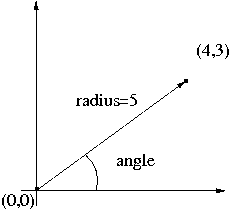
How do we get from cartesian coordinates to polar? Well, the radius is straighforward. This is the Euclidean distance from the origin; you may also see it as an application of the Pythagorean theorem: radius = sqrt(x2 + y2).
What about the angle? Well, if we think back to geometry, we know that
the tangent of an angle is the opposite side of a triangle divided by
the adjacent side. Thus, the tangent of the angle would be y (the
opposite side) divided by x (the adjacent side). Since we want the
angle itself, not the tangent, we must take the inverse tangent, which
is also called arctangent or atan, of the quotient. Therefore, angle =
atan(y/x). The PLT Scheme ( procedure
gives that angle, even when atan
y x)x is 0.
However, there is no correct answer when both x and y are zero; we return
0 in this case.
So can we write scheme functions to implement these? Certainly:
;;; Procedure:
;;; cartesian->polar-radius
;;; Parameters:
;;; x, a number
;;; y, a number
;;; Purpose:
;;; Convert cartesian coordinates to a polar coordinate radius
;;; Produces:
;;; radius, a number
;;; Preconditions:
;;; [No additional]
;;; Postconditions:
;;; radius = sqrt( x^2 + y^2)
;;; radius >= 0
(define cartesian->polar-radius
(lambda (x y)
(sqrt (+ (square x) (square y)))))
;;; Procedure:
;;; cartesian->polar-angle
;;; Parameters:
;;; x, a number
;;; y, a number
;;; Purpose:
;;; Convert cartesian coordinates to a polar coordinate angle
;;; Produces:
;;; angle, a number
;;; Preconditions:
;;; [No additional]
;;; Postconditions:
;;; -pi/2 <= angle <= pi/2
;;; If x is 0 and y is positive, y/x is undefined. However, trigonometry
;;; suggests that this "degenerate triangle" has an angle of pi/2, and
;;; so this procedure returns pi/2.
;;; If x is 0 and y is negative, y/x is undefined. However, this
;;; procedure returns -pi/2.
;;; If x and y are both 0, the angle is undefined. However,
;;; this procedure returns 0.
(define cartesian->polar-angle
(lambda (x y)
(if (and (zero? x) (zero? y))
0
(atan y x))))
Once we have polar coordinates in hand, it becomes very easy to express shapes. For instance, a circle is all the pixels where radius is less than or equal to some constant.
First, we make the center of a square image the (x,y) origin of the Cartesian coordinate system by translating any row or column by half the image size. Given this x and y, we can use our conversion procedures above to calculate the radius and angle for that location. Finally, coloring in the circle is simply a matter of checking the condition whether the radius of a point in polar coordinates is inside or outside the circle. If the circle has a diameter of 20, then we'd check whether the radius (of a pixel's location in the polar coordinates) is less than or equal 10.
Thus, we might write an expression like the following.

|
(image-compute
  (lambda (col row)
    (let* ((x (- col 25))
           (y (- row 25))
           (radius (cartesian->polar-radius x y))
           (angle (cartesian->polar-angle x y)))
      (if (<= radius 10)
          (rgb-new 255 0 0)
          (rgb-new 0 0 0))))
  50 50)
|
As you might imagine (or hope, for all this reading you're doing), there is an entirely different category of shapes you can create using polar coordinates. For instance, what happens if, rather than keeping a constant radius, as in a circle, we varied the radius with the angle around the origin? One example of this is something called the "polar rose," so named because it can resemble a flower. The equation for the polar rose is radius = 1 + sin(n * angle). A deceptively simple equation gives some remarkable visual properties. Using the circle code above as a template, we can package this into a procedure that gives us some useful behavior.
;;; Procedure:
;;;   polar-rose
;;; Parameters:
;;;   petals, an integer
;;;   size, an integer
;;; Purpose:
;;;   Compute an image of a flower using polar coordinates
;;; Produces:
;;;   image, an image
;;; Preconditions:
;;;   [No additional]
;;; Postconditions:
;;;   (image-height image) = (image-width image) = size
;;;   image contains a visualization of the polar rose
(define polar-rose
  (lambda (petals size)
    (let ((x-center (/ size 2))
          (y-center (/ size 2)))
      (image-compute
       (lambda (col row)
         (let* ((x (- col x-center))
                (y (- row y-center))
                (radius (cartesian->polar-radius x y))
                (scaled-radius (* 4 (/ radius size)))
                (angle (cartesian->polar-angle x y)))
           (if  (<= scaled-radius (+ 1 (sin (* petals angle))))
                (rgb-new 255 0 0)
                (rgb-new 0 0 0))))
       size size))))
Notice that we have given the multiplier inside the
sine function an interpretation. Namely, we have called it
petals. We have also generalized the code above
so that size of the image produced is a parameter. In order to keep
the figure entirely within the image, we have scaled the radius down.
Instead of just drawing the points where the radius equals the computed
value, we accept all smaller radii (so that the rose is filled in).
These last two changes are not strictly necessary, but makes for a
prettier, more complete picture.
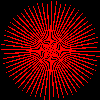
What happens when you use the procedure? You might try it out
with several different values for petals,
both small numbers and large numbers.
For example:
(image-show (polar-rose 4 100))
|
 |
(image-show (polar-rose 8 100))
|
 |
(image-show (polar-rose 64 100))
|
 |
In the next two parts, you'll get a chance to change the shape in (a), and the colors in (b).
a. The procedure polar-rose makes use of the
polar function radius = 1 + sin( n * angle). Using
polar-rose as a template, write a
procedure polar-shape that produces an image
using your own polar function of the form radius = __________. Some
possibilities include changing the parameter to the sine function,
incorporating other trigonometric functions (e.g., cosine or tangent),
or using more conditionals to further vary the behavior (i.e., radius
is one thing under one condition or something else under another).
You could also use a combination of these ideas. Of course, the sky is
the limit and you should not feel constrained to just these
possibilities.
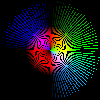
b. As is, polar-rose depicts the polar rose
shape using solid blocks of black and red. Create your own variation called
polar-rose-blend. In this variation, change the arguments
to rgb-new so that it produces
an interesting color blend based on the polar coordinates (radius and angle).
You may add any parameters to the polar-rose-blend you
find useful.
Here are just two examples of many possibilities.
 |
 |
Problem 3: An interesting image
Using image-compute and/or related procedures,
write a program that creates an interesting image.
Your image should be composed of at least three shapes, blends, and/or masks, as discussed above and in the reading and lab on building images by iterating over positions. If you wish, you may reuse code from Problem 2 or develop further variants using polar coordinates.
Your code should involve at least one conditional (if or
cond).