Assignment 5: A Miscellany of Image Models
Due: 11:00 a.m., Wednesday, 7 October 2009
Summary: In this assignment, you will explore a variety of the image models, including the pixel model, the turtle model, and the GIMP tools model. Our focus will be on using lists, iteration, and anonymous procedures within each of the models.
Purposes: To give you more experience with each of the image models. To give you more comfort with anonymous procedures.
Expected Time: Two to three hours.
Collaboration: We encourage you to work in groups of size three. You may, however, work alone or work in a group of size two or size four. You may discuss this assignment with anyone, provided you credit such discussions when you submit the assignment.
Submitting:
Email your answer to <weinman>. The title of your email
should have the form CSC151-02, 2009F Assignment 5: Image Models and
should contain your answers to all parts of the assignment. Scheme code
should be in the body of the message.
Warning: So that this assignment is a learning experience for everyone, we may spend class time publicly critiquing your work.
Assignment
Part 1: Transforming Images
Problem 1: Exploring Image Transformations
As you learned in
the reading on
transforming images, once we have a function that transforms
a color to another color, we can apply that function to each pixel
in an image with image-variant. For example,
if kitty is an image, we can make a slightly darker version
of that image with
>(define darker-kitty (image-variant kitty rgb-darker))
Often, it is useful to see what effect each of a variety of color transformations have on an image. For example, given a starting image, we might want one copy that is slightly darker, one copy that is slightly lighter, one copy that is slightly redder, and one copy that is slightly greener.
In essence, our algorithm might be expressed as
For each color-transformation
  Use image-variant to apply that transformation to the image
  Use image-show to show the resulting image
Express that algorithm in Scheme in as concise a form as possible.
(define image-show-variants
  (lambda (image list-of-transformations)
    ...))
Problem 2: Flattening Images
One common technique for manipulating images is to “flatten” the colors in the image, using a much more restricted scale. For example, we might ensure that the components are each multiples of 16, 32, or 64. (Well, we'll use 255 instead of 256 for the highest multiple.)
How do we convert each component to the appropriate multiple? Consider the case of multiples of 32. If we divide the component by 32, round, and then multiply by 32, we'll get the nearest multiple of 32. For example,
>(* 32 (round (/ 11 32)))0>(* 32 (round (/ 21 32)))32>(* 32 (round (/ 71 32)))64>(* 32 (round (/ 91 32)))96>(* 32 (round (/ 211 32)))224>(* 32 (round (/ 255 32)))256
a. Document and write a procedure, ( that flattens
rgb-flatten
rgb base)rgb by converting each component of
rgb to the nearest multiple of
base.
b. Write the most concise expression you can to show four flattened versions
of an image, using a base of 16 (first image), 32 (second image),
64 (third image), and 128 (fourth image). (You may use the
image-show-variants procedure you wrote for problem 1
and the rgb-flatten procedure you wrote for problem
2.a.)
Part 2: Turtles and Polygons
Note: Images that illustrate these various problems will be available in a few days.
Problem 3: Drawing Polygons
Write a procedure, (, that uses a turtle to draw a
regular polygon with the specified number of sides, with each side of
the specified length.
turtle-polygon!
turtle side-length
sides )
For example,
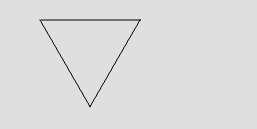
(turtle-polygon! t 100 3)

(turtle-polygon! t 100 4)

(turtle-polygon! t 60 5)

(turtle-polygon! t 40 6)
Your procedure should return the turtle to its original position and angle.
Note: The sum of the interior angles of a polygon with
N sides is (N-2)*180.
Problem 4: Spinning Polygons
Write a procedure, (, that draws the given number
of copies of the specified polygon, with the turtle turned an angle
of turtle-spin-polygon!
turtle side-length
sides angle
copies)angle between polygons.
For example,
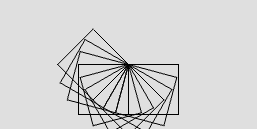
(turtle-spin-polygon! t 50 4 15 10)
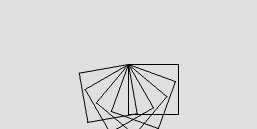
(turtle-spin-polygon! t 50 4 20 5)
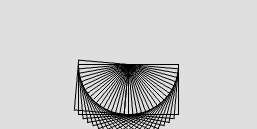
(turtle-spin-polygon! t 50 4 5 20)
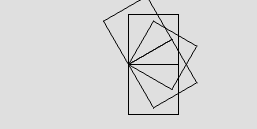
(turtle-spin-polygon! t 50 4 -30 5)
Problem 5: Scaling Polygons
Write a procedure, (, that draws the given number
of copies of the specified polygon, with each copy drawn with a
side length turtle-scale-polygon!
turtle initial-side-length
sides scale-factor
copies)scale-factor times the
the previous side length.
For example, if the initial side length is ten, and the scale factor is two, this procedure would draw polygons with side lengths 10, 20, 40, 80, 160, ....
Similarly, if the initial side length is 100, and the scale factor is 0.9, the procedure would draw polygons with side lengths 100, 90, 81, 72.9, ....
Here are some visual issues.
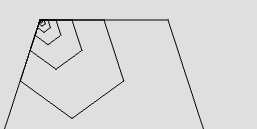
(turtle-scale-polygon! t 1 5 2 8)
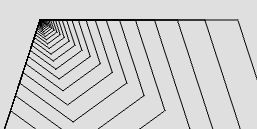
(turtle-scale-polygon! t 1 5 1.2 30)
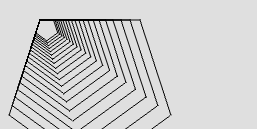
(turtle-scale-polygon! t 100 5 0.9 20)
Part 3: Iteration and Images
Problem 6: Selecting Interesting Shapes
In the lab on iteration,
we saw that it was possible to use for-each and
the GIMP tools procedures to build compound images similar to those
we built using map and the “drawings as
values” model, but with the added benefit that we could stroke
rather than select. In that example, we explored the following code.
>(define world (image-show (image-new 200 200)))>(image-select-nothing! world)>(for-each (lambda (left top) (image-select-ellipse! world ADD left top 12 10)) (map (l-s * 10) (iota 20)) (map (l-s * 9) (iota 20)))>(image-stroke! world)>(image-select-nothing! world)
Write a set of instructions to stroke the outside of a figure like the following (which we created in the reading on homogeneous lists). Your instructions should not cut off the bottom edge of the figure.

Hint: You may want to see how we created that image, and then think about how we can use selection tools to simulate the parts of the drawing.
Important Evaluation Criteria
We will judge your solutions on their correctness, their conciseness, and the cleverness.