Unsharp Mask
Introduction
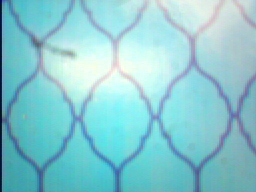
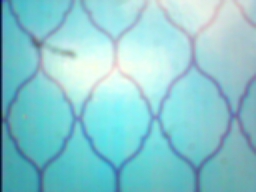
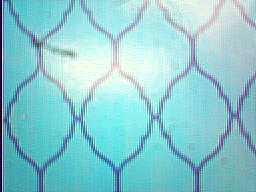
In CSC 151 you created a variety of interesting image transformations, but all of them were limited to the information at a single pixel. In this assignment we examine a category of image processing operations that use a small neighborhood surrounding a pixel. In particular, we will use the so-called "unsharp mask" technique, which adds a fraction of the difference between a blurred version of the image and the original back to an image in order to further enhance the places that change most when blurred (i.e., image details).
|
|
|
| Original Image | Blurred Image | Sharpened Image |
Sharpening an image with the blurred version (the unsharp mask) might proceed with the following basic steps
for each channel in R, G, B
    data ← getChannel(image, channel)
    avg ← calculateWindowAverage(data)
    diff ← data - avg
    data ← data  +  factor * diff
    setChannel(image, data, channel)
where data, avg, and diff are
all two dimensional arrays representing the appropriate
quantities. The arithmetic operations shown (e.g., - and
+) must be applied to corresponding
locations in these arrays.
Note that while values in avg must necessarily stay
within the unsigned char range required by
images, diff could have both positive or negative
values, which means we need to process these intermediate steps
outside the Picture data type. It's also possible that
the changes to data could take it outside the valid
0…255 range; we must therefore clip the results before
returning them to a Picture.
To sharpen, factor should be positive, but is typically
in the range of 0.5-1.5. (You can experiment to determine a value you
find appealing.)
How should one calculate a window average? Each point in the result should be the average of the pixels from the original data from around a 3 by 3 grid around that position. That is, for a given row r and column c, compute the average among the values in positions
| [c-1, r-1] | [c, r-1] | [c+1, r-1] |
| [c-1, r] | [c, r] | [c+1, r] |
| [c-1, r+1] | [c, r+1] | [c+1, r+1] |
When any of these row/column positions falls outside the image (i.e., above the top, to the left or right, below the bottom), ignored that position in computing the average.
Details
Write a program that takes a picture from the Scribbler 2's camera and sharpens it using this technique. That is, the program should do the following:
- Take a picture from the Scribbler 2's camera and display it.
- Use the original picture to obtain and display an averaged image.
- Use these two images to obtain and display a sharpened image.
Programming Notes
- Each step in the pseudocode algorithm shown in the introduction should be done by a separate function that takes and/or modifies appropriate parameters.
- The program may contain no global variables.
- Your averaging procedure may be easier to read and understand (not to mention more general) if you use loops to cover the region, rather than explicitly enumerating the neighbors.
Grading
In addition to the general grading guidelines for evaluation, the assignment is worth 25 points.
- [1 points] Captures and displays a picture from the Scribbler 2
- [7 points] Calculates and displays an average image
- [2 points] Average operation applied to each color channel
- [2 points] Calculates average at all image locations
- [2 points] Ignores out-of-bounds locations in average calculation
- [1 points] Displays average picture
- [4 points] Calculates difference data for each channel
- [7 points] Calculates and displays sharpened image
- [2 points] Sharpening operations applied to each color channel
- [2 points] Calculates sharpened data from original and difference
- [2 points] Restricts results to 0…255
- [1 points] Displays sharpened image
- [6 points] Tests demonstrate correctness
- [2 points] Test plan enumerates the range of problem circumstances
- [2 points] Test cases include specific inputs and expected outcome(s)
- [1 point] Transcripts demonstrate functionality with test runs
- [1 point] Statement argues why the program is correct
 This derivative work is used and licensed under a
Creative Commons Attribution-NonCommercial-ShareAlike 4.0 International license. The original by Henry Walker, except where noted, may be found here.
This derivative work is used and licensed under a
Creative Commons Attribution-NonCommercial-ShareAlike 4.0 International license. The original by Henry Walker, except where noted, may be found here.