Project: Image Suite
In this project you will implement a variety of image processing algorithms to familiarize yourself better with structs, two-dimensional arrays, and function pointers.
Image Filters
General Image Filter
void pictureTransform (Picture * pic, Pixel transform (Pixel) )
The next exercise shows that a variety of image transforms (also called
filters
) can be implemented by changing each pixel with a
function of the form:
Pixel transform (Pixel px)
Write the pictureTransform procedure, which behaves in a
manner analogous to the map procedure for lists in
Scheme. Because the address of a picture is passed as a parameter,
the procedure will modify the given picture by applying the pixel
transform function to each of its pixels.
Basic Image Filters
Write a series of functions that modify a picture
using pictureTransform. In each case, you will need to
write one or more helper functions to pass as pointers
to pictureTransform.
void pixelStrip (Picture * pic, char color)
This function should set the R, G,
or B field of every Pixel in the
given Picture to 0 (depending on what
character color is).
For example if
parameter color is 'G', then this procedure
should change the green component of each pixel in the picture to 0;
the red and blue components would remain unchanged.
void pictureRedder (Picture * pic)
void pictureGreener (Picture * pic)
void pictureBluer (Picture * pic)
These functions should increase the intensity of their respective color channels (red, green, or blue) and decrease the intensity of the other two. You may choose the amounts by which to change each. However, the results should never go outside the range 0…255.
Spatial Filter
While the above image transforms do the same thing regardless of the pixel location in the image, some filters use the coordinate of the pixel to determine the operation. The following procedure will therefore not usepictureTransform.
void circleSelect (Picture * pic, int xCenter, int yCenter, int radius)
This function should select a circle from your picture and turn each pixel strictly within that circle to the corresponding grayscale (intensity) value according to the following formula:
I = 0.30*R + 0.59*G + 0.11*BFinding Edges
Some filters also use information from more than one pixel to produce the output result. The last procedure will produce an edge map using the so-called Prewitt operator. What's that mean? You will produce a new image that is bright in locations where there are strong edges in the original image—regions of large change in brightness. The figure below provides an example.
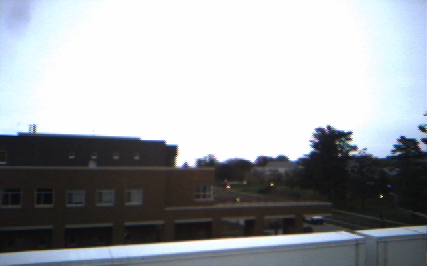
|
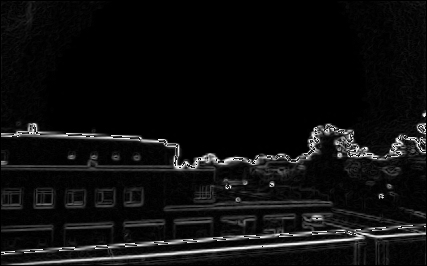
|
| Original Image | Image Edges |
|---|
Because you may need to keep values from the input image around as you construct the edge image, the function you write will not modify its argument. Instead it will return a new picture.
Picture
pictureEdges (const Picture * pic);
General Approach
To calculate the edge strength at each image location, we measure the change in image brightness both horizontally and vertically. To do so, we must look at the neighboring pixels around the location, giving slightly more weight to those along the same row or column.
Consider the 3x3 neighborhood of pixels around a given image location.
| a | b | c |
| d | e | f |
| g | h | i |
That is, if e represents the pixel brightness at location
(row,col), then a would represent
the pixel brightness at location
(row-1,col-1) and h would represent
the pixel brightness at location
(row+1,col).
To calculate the horizontal change, we use the weighted formula
and to calculate the vertical change we use the similar formula
To calculate the overall edge strength, we use the square root of the sum of squares:
Practical Details
Several practical details must be addressed before we can construct a working version of the approach outlined above.
First, in Pictures, the value at each location is not
simply a brightness, but RGB Pixels. Thus, each of the
values a, b, etc. used in the formulae above can be the
total image brightness at each location (i.e., R+G+B). To avoid
overflow, mind the variable type you use to store this sum!
It would make sense to store this sum so we don't have to recalculate it several times as we iterate over all the image locations. That would likely require you to declare a 2D array of the appropriate size and type. You can ignore this efficiency-saving step if you wish and simply calculate the sums as you need them in your calculation.
Second, the range of Δ is quite large. If we want to
visualize the result using the existing Picture
procedures, we'll need to scale it down. You will want to multiply
the resulting edge brightness Δ by the magic number
255/1140, which should bring the range to 0…255. The result
would be assigned to each RGB channel of a Pixel at the
corresponding location in the output image.
Next, edges aren't well-defined at image borders, so we will assume all eight neighboring values exist by skipping the outermost rows and columns of the image. (They should be black in the edge image.)
Finally, you should write several helper functions to decompose and delegate the tasks involved for computing the entire edge strength image (e.g., calculating the total brightness of a pixel, finding the directional strengths at a location, integrating these into the final edge strength for that location).
Detailed Example
Suppose the following pixel neighborhood is encountered. The original R; G; B pixel values will be given in that order (and colored to aid interpretability).| 34; 192; 64 | 48; 197; 57 | 52; 210; 52 |
| 33; 192; 60 | 42; 197; 59 | 47; 210; 55 |
| 35; 248; 65 | 44; 198; 67 | 52; 212; 62 |
| 290 | 302 | 314 |
| 285 | 298 | 312 |
| 348 | 309 | 326 |
| δh | = | (290+ 2×285 +348) – (314 + 2×312 + 326) |
| = | 1208 – 1264 | |
| = | – 56 | |
| δv | = | (290+ 2×302 +314) – (348 + 2×309 + 326) |
| = | 1208 – 1292 | |
| = | – 84 | |
| Δ | = | ( (–56)2 + (–84)2)½ |
| = | ( 3136 + 7056 )½ | |
| = | 10192½ | |
| ≈ | 100.9554 |
| 100.9554 × 255 / 1140 | ≈ | 22.5821 |
unsigned char the
value would be truncated to 22.
Reminders
When turning in your project, be sure to include tests and examples of pictures from each function.
Be sure to cite any materials from which your solution is derived or by which it is influenced.
Grading
In addition to the general grading guidelines for evaluation, the project is worth 25 points.
-
[3 points] Function
pictureTransformmeet specifications. -
[3 points] Function
pixelStripmeet specifications with JPEG examples (input and output results) included. -
[3 points]
Functions
pictureRedder,pictureGreener, andpictureBluermeet specifications with JPEG examples (input and output results) included. -
[4 points] Function
circleSelectmeets specifications with JPEG examples (input and output results) included. -
[8 points] Function
pictureEdgesmeets specifications with JPEG examples (input and output results) included. - [4 points] A test driver program generates all output examples
-
Comments on Program Format, Comments, Readability, Testing, etc.
(Points not given, but points can be deducted.)
A five point penalty will apply to any submission that includes personally identifying information anywhere other than the references/honesty file.
